


Published on: September 1, 2025 | Updated on: September 1, 2025
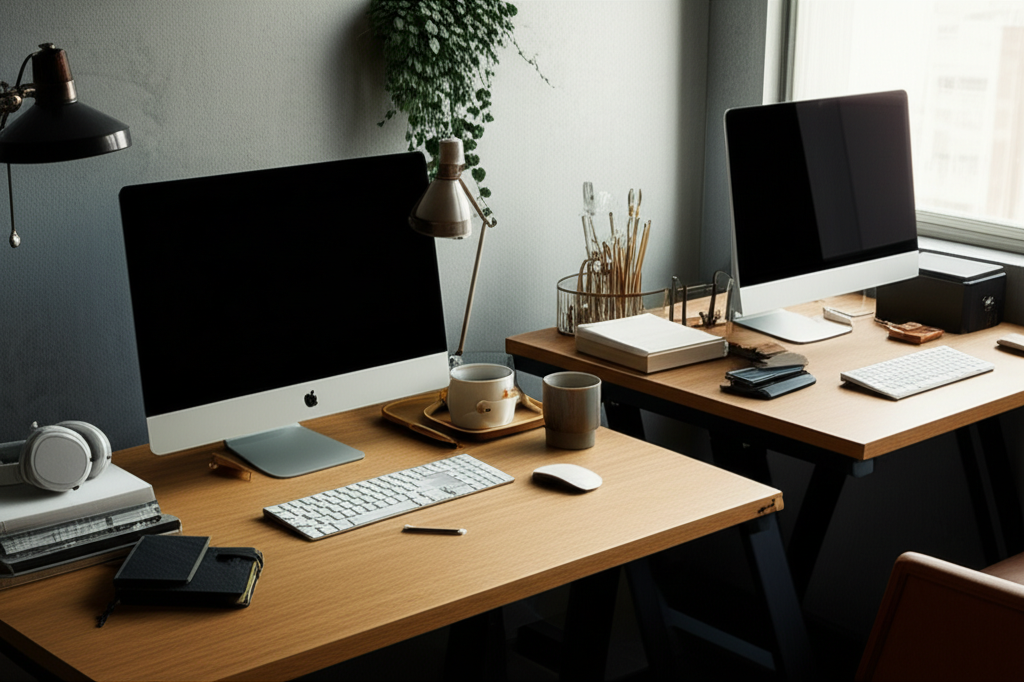
Discover genius and effective two desk office layout ideas to maximize productivity and collaboration in shared or expansive home workspaces. Optimize your setup for efficiency and comfort, transforming your office into a dual-function hub.
Working from home has become the norm for many, and with it, the need for a functional and inspiring workspace has skyrocketed. But what happens when one desk just isn’t enough? Perhaps you share your home office with a partner, a roommate, or you simply need distinct zones for different types of work. Finding effective two desk office layout ideas can be a game-changer, transforming a potentially cramped or chaotic space into a haven of productivity and collaboration. Many of us struggle with how to arrange multiple workstations without sacrificing space, light, or a sense of calm. Don’t worry, I’m here to guide you through creating a smart, stylish, and incredibly effective dual-desk office. We’ll explore genius layouts that cater to various needs, ensuring both desks serve their purpose beautifully.
Contents
- 1 Why Two Desks? Unpacking the Need for a Dual Workspace
- 2 Genius Two Desk Office Layout Ideas: Maximizing Functionality
- 3 Optimizing Your Two Desk Office: Ergonomics and Accessories
- 4 Design Strategies for a Harmonious Dual Workspace
- 5 Addressing Common Challenges in Dual Desk Setups
- 6 Popular Desk and Accessory Options for Dual Workspaces
- 7 Creating Your Ideal Two Desk Office: A Step-by-Step Approach
- 8 Frequently Asked Questions About Two Desk Office Layouts
- 9 Conclusion: Your Productive Dual Workspace Awaits
- 10 Author
Why Two Desks? Unpacking the Need for a Dual Workspace

Many professionals find themselves needing more than a single workstation to manage their diverse tasks or share their home office effectively. Whether it’s for collaborative projects, separating creative work from administrative tasks, or simply accommodating two individuals in one space, a well-planned dual-desk setup is essential. Understanding the core reasons behind needing two desks is the first step to designing an optimized layout that truly serves your purpose.
The Rise of the Shared Home Office
The surge in remote work has made shared home offices a common reality. For couples, families, or roommates working from home, creating separate, functional workspaces within a single room is often necessary. This setup demands thoughtful planning to ensure both individuals have adequate space, privacy, and minimal distractions, making two desk office layout ideas a hot topic for many households.
Separating Work Modes for Peak Productivity
Even for a single person, having two desks can significantly boost productivity by allowing for task segmentation. One desk could be dedicated to focused, heads-down work with minimal distractions, while the other might be set up for creative brainstorming, video calls, or as a more relaxed work area. This physical separation of work modes can help your brain switch gears more easily, improving concentration and efficiency.
Accommodating Growth and Future Needs
Investing in a dual-desk setup can also be a forward-thinking decision. As your workload expands or your family’s remote work needs evolve, having a flexible workspace that can accommodate additional users or different work styles from the outset provides a significant advantage. It’s about building a workspace that grows with you.
Genius Two Desk Office Layout Ideas: Maximizing Functionality
When considering two desk office layout ideas, the goal is to create distinct yet harmonious zones that foster productivity and minimize conflict. The best layouts consider the room’s dimensions, natural light sources, and traffic flow. Here are some genius approaches to arranging two desks effectively.
The Parallel Powerhouse: Facing the Same Direction
This layout is ideal for maximizing shared space and fostering a sense of unity, especially in a rectangular room. Placing two desks parallel to each other, both facing the same direction, creates a clean, organized look. It’s particularly effective if you have a shared view or want to minimize direct visual distraction between workstations.
Pros: Maximizes wall space, creates a streamlined aesthetic, good for collaboration if facing slightly inward.
Cons: Can feel less private, requires sufficient depth in the room to avoid feeling cramped.
Best For: Couples working together, teams needing to face a common monitor or whiteboard, rooms with a strong focal point like a window.
For this setup, consider using matching or complementary desks to maintain visual cohesion. Ensure adequate legroom and consider a shared shelving unit between or behind the desks for common supplies. This arrangement promotes a sense of shared purpose while maintaining individual work territories.
The Face-Off: Back-to-Back Arrangement
If privacy and minimizing distractions are paramount, the back-to-back layout is a stellar choice. This arrangement positions the desks with their backs facing each other, creating a natural divider and offering each user their own distinct zone. It’s a fantastic way to foster focus while still sharing the same room.
Pros: Excellent for privacy, reduces visual distractions, allows for independent cable management.
Cons: Can take up more floor space, may require careful consideration of lighting for both users.
Best For: Individuals with different work styles, those who need to minimize eye contact during work, shared offices where focus is key.
A smart implementation of this layout involves using a low bookshelf or a strategically placed plant stand between the desks. This adds a functional element, like storage, while reinforcing the separation without completely blocking sightlines.
The Corner Collaboration: L-Shaped Duo
For rooms with a corner or for those who want to define distinct work areas within a larger space, the L-shaped layout is incredibly versatile. This involves placing two desks at a right angle to each other, often utilizing a corner of the room. It can be done with two separate desks or by using an L-shaped desk with a return.
Pros: Utilizes corner space efficiently, defines individual zones clearly, allows for easy access to both desks.
Cons: May not be suitable for all room shapes, can create a visual barrier if not planned carefully.
Best For: Maximizing corner real estate, creating distinct zones for different tasks, individuals who appreciate defined personal space.
This setup is brilliant for creating a workflow. One desk could be your primary computer station, while the other serves as a creative hub for sketching, writing, or holding informal meetings.
The Wall Embrace: Desks Against the Same Wall
Placing two desks side-by-side against a single wall is a classic and often space-saving solution. This arrangement is particularly effective in longer, narrower rooms or when you want to keep the center of the room open. It’s a straightforward way to create two functional workspaces.
Pros: Space-efficient, keeps the room feeling open, easy to implement.
Cons: Minimal privacy between users, can be less visually dynamic.
Best For: Smaller rooms, situations where privacy isn’t a major concern, creating a unified work front.
To add interest and separation, consider using different desk accessories or monitor setups for each station. A shared but stylish monitor riser can also help declutter the space and create a sense of shared organization.
The Opposite Walls: Creating Dual Focus Points
If your room is more square or you want to create two distinct work zones that feel independent, placing desks on opposite walls is an excellent strategy. This approach naturally divides the room and gives each user their own focal point, often facing a window or a key feature of the room.
Pros: Maximizes natural light if placed near windows, provides maximum privacy, creates distinct work zones.
Cons: Requires more floor space, may not be ideal for close collaboration.
Best For: Larger rooms, individuals who need maximum focus and privacy, homes where the office is also a shared living space.
This layout encourages each person to create their own productive atmosphere. Consider complementary décor styles that allow for individual expression while maintaining an overall harmonious room aesthetic.
Optimizing Your Two Desk Office: Ergonomics and Accessories
Beyond just placement, optimizing your two desk office layout ideas involves ensuring both workstations are ergonomic and equipped with the right accessories to support productivity and well-being. Investing in quality furniture and thoughtful additions can make a world of difference.
The Ergonomic Foundation: Chairs and Desks
Your primary tools are your desk and chair. For a dual setup, consider investing in ergonomic chairs for both users. Look for adjustable height, lumbar support, and comfortable seating. Similarly, consider desk heights that suit your primary working posture, whether seated or standing. A height-adjustable standing desk can be a fantastic investment for one or both stations, promoting movement and reducing sedentary time. Exploring options like Herman Miller Aeron Chair can provide a benchmark for quality ergonomic seating.
Lighting: The Unsung Hero of Productivity
Proper lighting is crucial for any workspace, but with two desks, it becomes even more critical. Aim for a mix of ambient, task, and natural lighting. Position desks to take advantage of natural light from windows, but avoid glare on screens. Desk lamps for each station are essential for focused work, especially during evenings or on overcast days. Consider smart bulbs that allow for adjustable color temperature and brightness to suit different tasks and times of day.
Storage Solutions: Declutter for Focus
With two workstations, clutter can quickly become overwhelming. Implement smart storage solutions that keep work areas tidy. This might include:
Floating Shelves: Great for books, décor, and frequently used items without taking up desk space.
Drawer Units/Pedestals: Keep supplies organized and out of sight.
Cable Management Systems: Essential for keeping wires tidy and preventing a visual mess. Look for cable trays, sleeves, or clips.
Wall Organizers: Pegboards or wall-mounted organizers can free up desk surface area.
Effective storage ensures that both desks remain functional and visually appealing, contributing to a more focused work environment.
Technology Integration: Power and Connectivity
Ensure both desks have adequate power outlets and connectivity. Consider a central power strip or surge protector that can be easily accessed by both users. For shared devices like printers or scanners, place them in a central, easily accessible location. Wireless peripherals can also significantly reduce cable clutter, enhancing the aesthetic of your two desk office layout ideas.
Design Strategies for a Harmonious Dual Workspace
Creating a visually appealing and cohesive dual-desk office involves more than just functionality. Thoughtful design choices can make the space feel intentional, inspiring, and comfortable for everyone using it.
Color Palette and Décor Cohesion
While each user might have personal preferences, establishing a unifying color palette for the room is key. Choose a base color for the walls and larger furniture pieces that both individuals agree on. Then, allow for personal touches through accessories, desk décor, and chair colors at each station. This approach creates a sense of harmony without sacrificing individuality.
Defining Zones Visually
Even in layouts where desks are close, you can visually define each person’s space. This can be achieved through:
Area Rugs: Placing a rug under each desk area can visually segment the space.
Desk Placement: As discussed in layout ideas, angles or specific positioning can create natural divisions.
Lighting: Different desk lamps or even the positioning of overhead lights can highlight individual workspaces.
Plants: Strategic placement of plants can act as natural dividers and add a touch of biophilic design.
These subtle cues help create distinct territories, making the shared space feel more organized and less like a single, undifferentiated work zone.
Incorporating Personal Touches Thoughtfully
A workspace should be inspiring, and personal touches are essential for this. Encourage each person to add items that motivate them, such as photos, artwork, or plants. However, with dual setups, it’s important to maintain a balance. Avoid excessive clutter that can detract from productivity. A good rule of thumb is to keep personal items contained to the desk surface or a designated shelf.
Addressing Common Challenges in Dual Desk Setups
Implementing two desk office layout ideas isn’t always without its hurdles. Being prepared for common challenges and having solutions ready can make the transition smoother and the final setup more successful.
Managing Noise and Distractions
In a shared office, noise can be a significant disruptor. Consider noise-canceling headphones as a primary solution for individuals needing deep focus. For the space itself, soft furnishings like rugs and curtains can help absorb sound. If possible, position desks so that users aren’t directly facing each other, which can sometimes increase distraction.
Cable Management Overload
Two desks often mean double the cables for computers, monitors, chargers, and accessories. Investing in robust cable management solutions is non-negotiable. This includes cable trays that mount under desks, cable sleeves to bundle wires together, and adhesive cable clips to guide them along walls or desk legs. A good cable management guide can offer practical advice.
Ensuring Adequate Personal Space
Even in close proximity, everyone needs a sense of personal space. The layout itself plays a significant role, but also encourage respectful boundaries. This can include agreeing on shared quiet hours or establishing norms around talking on the phone or playing music. Thoughtful furniture placement and décor can also reinforce these personal boundaries.
Popular Desk and Accessory Options for Dual Workspaces
Choosing the right furniture and accessories can elevate your two desk office layout ideas from functional to fantastic. Here are some popular and effective options to consider:
Desk Types to Consider:
Standard Rectangular Desks: Versatile and readily available in various sizes and styles.
L-Shaped Desks: Excellent for corner placement or creating distinct work zones.
Standing Desks (Adjustable or Fixed): Promote health and offer flexibility. Consider electric adjustable-height desks for ease of use.
Wall-Mounted Desks: A minimalist option, ideal for smaller spaces or creating a clean aesthetic.
Essential Ergonomic Accessories:
Ergonomic Chairs: Crucial for comfort and long-term health.
Monitor Arms: Free up desk space and allow for optimal monitor positioning.
Footrests: Can improve posture and comfort for shorter individuals.
Keyboard Trays: Help achieve proper keyboard height and angle.
Organization and Tech Accessories:
Desk Organizers: Keep pens, notebooks, and other small items tidy.
Cable Management Boxes/Trays: Hide unsightly power strips and excess wiring.
Task Lighting: Essential for focused work.
* Power Strips with USB Ports: Convenient for charging multiple devices.
Creating Your Ideal Two Desk Office: A Step-by-Step Approach
Ready to implement your two desk office layout ideas? Follow these steps to create a productive and harmonious workspace.
1. Assess Your Space: Measure your room accurately. Identify windows, doors, power outlets, and any architectural features that might impact your layout.
2. Define Your Needs: Are you sharing the space? Do you need distinct work zones? What are your primary tasks? Understanding your requirements will guide your layout choice.
3. Choose Your Layout: Based on your space and needs, select the best layout from the ideas discussed (parallel, back-to-back, L-shaped, etc.).
4. Select Your Furniture: Opt for desks and chairs that fit the chosen layout, your budget, and your ergonomic needs. Consider complementary styles for a cohesive look.
5. Plan for Lighting: Determine how you’ll maximize natural light and supplement it with task and ambient lighting for each desk.
6. Implement Storage and Cable Management: Invest in solutions to keep both workstations tidy and functional.
7. Add Personal Touches: Once the core setup is complete, add personal items that inspire and motivate, keeping the overall aesthetic in mind.
8. Test and Adjust: Live with the setup for a week or two and make any necessary adjustments to optimize comfort and workflow.
Frequently Asked Questions About Two Desk Office Layouts
Q1: How much space do I need for two desks?
The space required depends heavily on the desk sizes and the layout chosen. A general guideline for a comfortable parallel or back-to-back setup would be a room at least 10-12 feet wide and 12-15 feet long, allowing ample circulation space. L-shaped layouts can be more space-efficient in corners. Always measure your furniture and the room to ensure a good fit.
Q2: How can I minimize distractions in a two-desk office?
Use noise-canceling headphones, choose a layout that offers some visual separation (like back-to-back or opposite walls), and implement clear boundaries with your office mate regarding noise levels and phone calls. Keeping both desk areas organized also contributes to a calmer environment.
Q3: What’s the best way to manage cables for two desks?
Invest in cable management solutions like under-desk trays, cable sleeves, ties, and adhesive clips. Consider a desk with built-in cable management features or opt for wireless peripherals where possible to reduce the tangle. A single, well-organized power strip with surge protection can also streamline connections.
Q4: Should both desks be the same?
Not necessarily. While matching desks can create a very cohesive look, using complementary desks in similar styles or finishes can also work beautifully. The key is to ensure they fit the space and your needs. If you’re using different desks, consider unifying them with similar accessories or a consistent color scheme for the surrounding area.
Q5: How do I balance personal style when two people use the same office?
Establish a core color palette and style for the room that both individuals agree on. Then, allow each person to personalize their immediate desk area with items that reflect their personality. Using elements like individual desk mats, unique desk lamps, or small decorative items can help create distinct yet harmonious zones.
Conclusion: Your Productive Dual Workspace Awaits
Creating an effective two desk office layout ideas setup is entirely achievable with thoughtful planning and the right approach. By considering your space, your needs, and incorporating ergonomic principles alongside smart design strategies, you can transform a potentially challenging situation into a highly productive and enjoyable dual workspace. Remember, the goal is to foster efficiency, comfort, and a sense of shared purpose or distinct focus, depending on your requirements. Experiment with the layouts, invest wisely in your comfort, and don’t be afraid to add those personal touches that make your office truly yours. Your optimized workspace is just a few decisions away, promising enhanced productivity and a more fulfilling work-from-home experience.
