


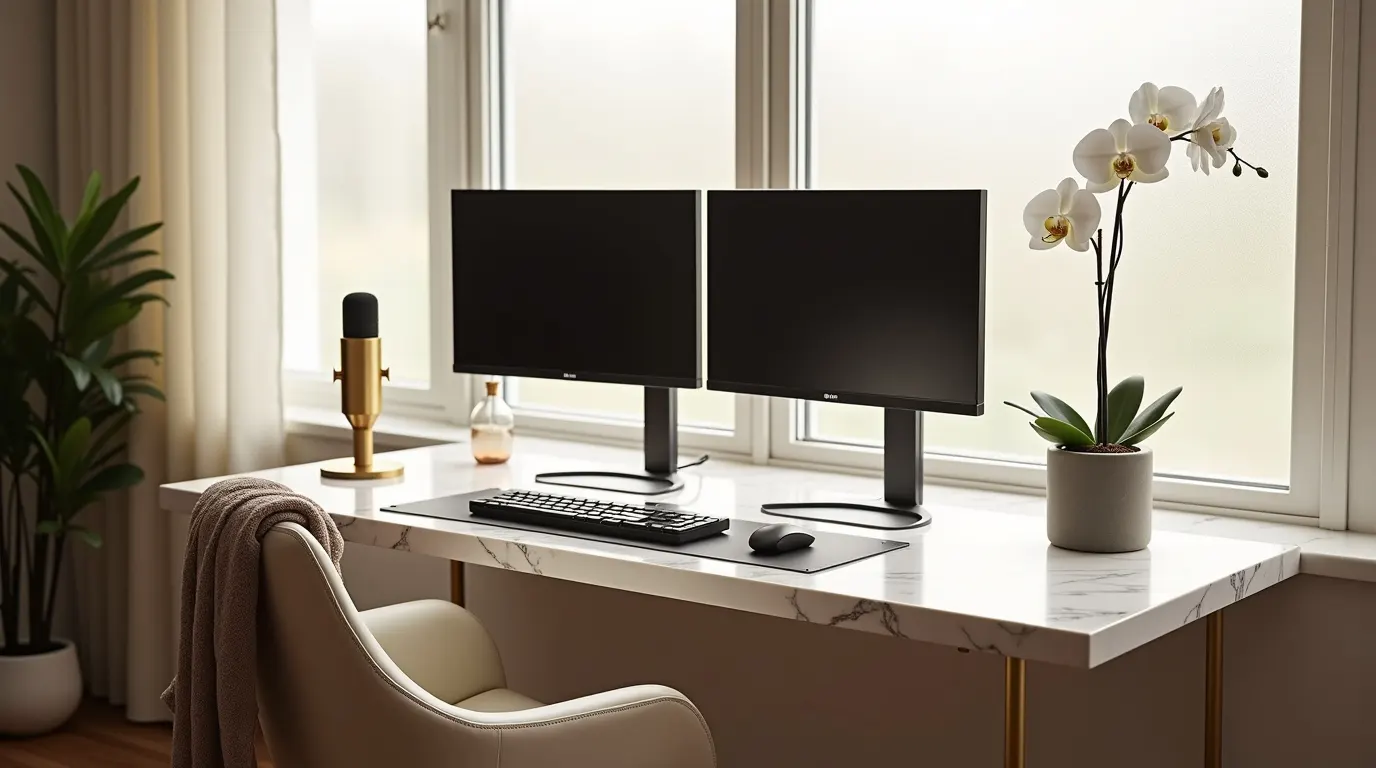
Maximize productivity and style in your compact workspace with these essential and genius dual monitor small home office ideas. Discover smart layouts, ergonomic solutions, and space-saving tips to create your dream setup, no matter the square footage.
Having a dedicated workspace is crucial for productivity, but what happens when that space is less than generous? Many remote workers find themselves in compact homes, facing the challenge of setting up an efficient and comfortable dual-monitor workstation. It’s easy to feel overwhelmed, wondering if it’s even possible to accommodate two screens, essential gear, and still maintain a sense of calm. But fear not! With the right approach, your small home office can become a powerhouse of productivity and a haven of style. We’ll guide you through essential, genius dual monitor small home office ideas, transforming your limited space into a functional and inspiring environment.
The Power of Two: Why Dual Monitors in Small Spaces Work
Dual monitor setups are no longer just for gamers or graphic designers; they’ve become a staple for many professionals seeking enhanced productivity. For those in smaller homes, the initial thought might be that it’s simply too much to handle. However, strategically implementing dual monitors can actually make a small space feel more organized and efficient. It reduces the need to constantly switch between applications, keeping your workflow seamless and your focus sharp.
This arrangement allows you to have multiple windows open simultaneously, such as your primary work application on one screen and communication tools or research on the other. This immediate access to information and tools minimizes context switching, a major productivity killer. By cleverly arranging your dual monitors, you can create a command center that feels expansive, not cramped.
Understanding Your Small Space: The Foundation of Smart Design
Before diving into specific dual monitor small home office ideas, it’s vital to thoroughly assess your available space. Measure your desk area, consider wall space, and identify any architectural quirks like nooks or awkward corners. Understanding your limitations and potential is the first step to overcoming them.
Think about the flow of your room and how the desk will integrate without obstructing walkways or making the space feel cluttered. Consider the natural light sources and how your monitors will be positioned to avoid glare. This initial assessment prevents costly mistakes and ensures your chosen solutions are practical for your unique environment.
Desk Selection: The Cornerstone of Your Dual Monitor Setup
Choosing the right desk is paramount when implementing dual monitors in a small home office. You need ample surface area for two screens, your keyboard, mouse, and other essentials, without overwhelming the room. The goal is to find a desk that’s functional, stylish, and appropriately sized.

Compact Desks with Ample Depth
Look for desks that offer sufficient depth to comfortably house two monitors side-by-side or in a slightly staggered arrangement. A desk that’s too shallow will lead to your monitors being too close, causing neck strain and a cramped feel.
Corner Desks for Space Efficiency
Corner desks are often overlooked but can be a genius solution for small spaces. They utilize often-underused corner real estate, providing a surprisingly large surface area for dual monitors and ample workspace. This can create a more immersive and defined work zone.
Wall-Mounted or Floating Desks
For the ultimate space-saving solution, consider a wall-mounted desk. These sleek units attach directly to the wall, freeing up floor space and giving the illusion of a larger room. They’re perfect for minimalist aesthetics and can support dual monitors with the right mounting.
Monitor Placement: Ergonomics Meets Efficiency
The way you position your dual monitors significantly impacts both your comfort and productivity. In a small space, smart placement is key to avoiding a cluttered feel and ensuring ergonomic health.
Side-by-Side Arrangement
The most common setup involves placing monitors next to each other. Ensure the bezels are as close as possible to create a more seamless viewing experience. This arrangement is ideal for tasks requiring you to view two documents or applications simultaneously.
Stacked Monitor Setup
For even tighter spaces, consider stacking your monitors vertically. This can be achieved using monitor arms or specialized stands. While it might require a slight adjustment in viewing angle, it frees up significant horizontal desk space, making it a great option for narrow desks.
Ergonomic Considerations
Regardless of your chosen arrangement, proper monitor height is crucial. The top of your screens should be at or slightly below eye level, and you should be able to view them with a slight downward gaze. This prevents neck and eye strain, essential for long work sessions.
Harnessing Vertical Space: Smart Storage and Organization
In a small home office, every inch counts, especially when dealing with the footprint of dual monitors and associated equipment. Utilizing vertical space for storage and organization is a game-changer.
Monitor Risers and Stands
Invest in monitor risers or stands that elevate your screens. Many of these also offer built-in storage compartments or drawers underneath, perfect for tucking away keyboards, notebooks, or other desk essentials. This keeps your primary workspace clear and organized.
Wall Shelving and Pegboards
Wall-mounted shelves or pegboards can be invaluable for storing office supplies, documents, and even decorative items. This keeps items off your desk, creating a cleaner, more spacious look. A well-organized wall unit can significantly enhance the functionality of your dual monitor setup.
Cable Management Solutions
Tangled cables can quickly make a small space feel chaotic. Invest in cable clips, sleeves, or a cable management box to neatly bundle and hide wires. This not only improves the aesthetic but also makes your workspace safer and more functional.
Lighting Your Dual Monitor Workspace for Productivity and Comfort
Proper lighting is essential for any home office, but it’s particularly critical in a small dual-monitor setup to prevent eye strain and maintain a productive atmosphere. Natural light is ideal, but artificial lighting needs careful consideration.
Ambient and Task Lighting
Combine ambient lighting (general room light) with task lighting (a desk lamp) to create a well-lit environment. Position your desk so that natural light comes from the side, not directly in front or behind your monitors, to minimize glare.
Avoiding Glare
Glare on your screens can cause significant eye fatigue. Position your monitors perpendicular to windows or use blinds to control the intensity of natural light. If using a desk lamp, ensure it’s directed towards your workspace and not reflecting off your screens.
Smart Bulb Technology
Consider smart bulbs that allow you to adjust brightness and color temperature. Warmer tones can be more relaxing, while cooler, brighter tones can boost alertness during work hours. This adaptability is perfect for different tasks and times of day.
Ergonomic Seating: Supporting Your Body for Long Workdays
When you’re working with dual monitors, you’ll likely be spending extended periods at your desk. Investing in an ergonomic chair is not just a comfort choice; it’s an investment in your health and long-term productivity.
Key Ergonomic Features
Look for chairs with adjustable height, lumbar support, armrests, and a seat depth that allows your feet to rest flat on the floor. These features help maintain proper posture and reduce the risk of back pain and other musculoskeletal issues.
Chair Fit for Small Spaces
Even ergonomic chairs come in various sizes. Opt for a chair with a smaller footprint or one that can be easily tucked under the desk when not in use. Consider chairs with a swivel base for easy movement within your limited workspace.
The Standing Desk Option
For those who want to break up long sitting periods, a height-adjustable or standing desk can be a fantastic addition. Many compact standing desks are available, and pairing one with your dual monitors can significantly improve your physical well-being.
13 Beautiful Dual Monitor Small Home Office Ideas That Feel Calm & Productive
🌸 This Blush Stone Workspace Feels More Like a Fashion Atelier Than a Desk

Not every workspace needs to look like tech. This blush stone atelier–inspired home office is sculptural, soft, and deeply calming—designed to feel like a creative sanctuary. Curved plaster walls, a stone-textured desk, and seamlessly integrated dual monitors create a space where work feels intentional, not overwhelming. Warm daylight, tactile fabrics, and subtle styling details turn this into a quiet luxury moment you’ll want to save for inspiration.
Perfect for creatives, designers, and anyone dreaming of an aesthetic home office that feels beautiful first, functional second.
🌸This Pearl-Inspired Dual Monitor Office Glows Differently Every Hour

This isn’t about color—it’s about light. This pearl-inspired productivity room shifts mood throughout the day, glowing softly at golden hour and calming the mind without feeling cold. Pearlescent walls, a curved pearl-gray desk, and ultra-thin dual monitors reflect light like real pearls, creating depth no flat workspace can match.
If you love luxury home offices, calm productivity spaces, and aesthetic dual monitor setups that feel peaceful (not techy), this is the kind of workspace you’ll want to save and recreate.
🌸 This Soft Power Home Office Proves You Can Be Feminine and Powerful

This workspace isn’t cute—and it isn’t corporate. It’s soft power. A sculptural, monument-style desk anchors the room with quiet authority, while warm stone, blush tones, and brass accents keep it refined and feminine. Dual monitors blend seamlessly into the design, supporting focus without dominating the space.
Perfect for women building leadership energy at home, this executive-style office shows how confidence can feel calm, intentional, and beautifully strong. Save this if you want a home office that reflects power without losing softness.
🌸 This Quiet Luxury Garden Office Makes Dual Monitors Feel Peaceful

This is what happens when technology meets nature—without losing elegance. Dual monitors are framed by living greenery, soft daylight, and warm natural textures, turning a functional home office into a quiet luxury retreat. Sage plaster walls, light wood, linen, and organic styling make the space feel grounded, calm, and deeply intentional.
If you’re drawn to garden-inspired interiors, luxury home offices, or dual monitor setups that don’t feel harsh, this is the kind of workspace you’ll want to save and revisit.
🎨 Stunning Dual Monitor Small Home Office Ideas with a Moody Feminine Edge

These dual monitor small home office ideas are perfect for women who want power and softness in one space. This female home office dual monitor setup blends smoky rose tones with a dual monitor desk setup aesthetic that feels confident, calm, and deeply luxurious. If you love elevated design with personality, save this stylish dual monitor home office for inspiration.
#dualmonitorsetup #feminineworkspace #luxuryhomeoffice #workspaceinspo
🖼️ Minimalist Dual Monitor Small Home Office Ideas That Feel Calm & Creative

Dreaming of a peaceful workspace? These dual monitor small home office ideas are designed for calm focus and beauty. Perfect for a minimalist dual monitor home office or a dual monitor workspace for small rooms, this soft aqua setup creates a serene flow without clutter. Save this dual monitor desk setup cozy look if you want workdays to feel lighter.
#cozyworkspace #dualmonitorlife #homeofficeideas #calmspaces
🌾 Cozy Dual Monitor Small Home Office Ideas with Earthy Luxury Style

These dual monitor small home office ideas prove cozy can still be productive. Designed for a dual monitor workstation small space with a grounded, editorial feel, this setup blends warm textures and a dual monitor setup without clutter. Save this dual monitor home office design if you love calm, earthy, and timeless spaces.
#cozyhomeoffice #dualmonitorsetup #earthyinteriors #workspacegoals
🌙 Luxurious Dual Monitor Small Home Office Ideas with Midnight Plum Style

These dual monitor small home office ideas are perfect if you love elegance with depth. Designed for a stylish dual monitor home office and a dual monitor desk setup aesthetic, this plum-toned workspace feels creative, confident, and cozy. Save this female home office dual monitor setup if you want drama without clutter.
#luxuryhomeoffice #dualmonitorsetup #feminineworkspace #workspaceinspo
🔮 Wait… How Is This Desk Floating? (Dual Monitor Home Office)

At first glance, it doesn’t make sense—and that’s why it works. This floating light desk uses hidden illumination and shadow to create a surreal, almost impossible effect. Dual monitors glow softly above an ivory slab desk that appears to hover, turning a small home office into a quiet luxury illusion.
Pinterest users save what makes them pause. If you love modern home offices, visual illusions, and dual monitor setups that feel more like art than tech, this is one workspace you won’t forget.
🌸 I’ve Never Seen a Workspace Feel Like This (Soft Color-Washed Office)

This room isn’t accented with color—it exists inside it. A soft coral haze wraps the entire workspace through light, shadow, and reflection, creating an atmosphere that feels warm, immersive, and quietly surreal. The dual monitor setup stays neutral and grounded, letting the color-washed reality do the emotional work.
Pinterest users save spaces that feel new but believable. If you’re drawn to modern home offices, immersive interiors, and design ideas that feel bold without being loud, this is a workspace you’ll want to revisit.
🔥 This Powder Blue & Butter Desk Feels Like a Breath of Fresh Air

Some workspaces don’t just look good—they feel good. This powder blue and warm butter home office blends cool morning air with soft sunlight, wrapping the desk in light instead of hitting it harshly. The dual monitor setup stays calm and balanced, letting the color and glow do the emotional work.
If you love fresh interiors, soft color harmony, and home office ideas that feel peaceful the moment you see them, this is a space worth saving.
🌸 This Sage Mist Workspace Feels Quietly Expensive

Nothing here is loud—and that’s the point. This sage mist and cool limestone home office feels calm, intelligent, and deeply refined, as if the space is gently exhaling. Diffused daylight wraps the desk and dual monitors in a soft haze, letting texture and tone create presence instead of contrast.
Pinterest users save spaces that feel thoughtful, elevated, and rare. If you’re drawn to earthy color stories, quiet luxury interiors, and home offices that feel expensive without trying, this one belongs on your inspiration board.
✨ Rosewood Glow × Pearl Ash Home Office — Feminine Strength Meets Quiet Drama

Step into a home office that feels both powerful and intimate. This Rosewood Glow × Pearl Ash palette wraps your workspace in soft, emotional warmth, with sculptural desks and dual monitors bathed in glowing, rosewood-toned light. Perfect for creating, reflecting, and staying inspired, this aesthetic makes you think: “I want to sit here forever.” Save this dreamy setup for your next home office makeover! 🌸💻 #HomeOfficeGoals #InteriorInspo #RosewoodGlow #PearlAsh #CozyWorkspace #FeminineStrength #DeskSetupIdeas
Technology Hacks: Maximizing Your Dual Monitor Setup
Beyond furniture and layout, several technology-driven hacks can enhance your dual monitor small home office experience. These solutions focus on optimizing workflow and reducing clutter.
Monitor Arms for Flexibility and Space Saving
Dual monitor arms are a brilliant solution for small spaces. They lift your monitors off the desk, freeing up valuable surface area. Many arms allow for extensive adjustability, letting you position each monitor at the perfect height, angle, and distance for optimal ergonomics and workflow.
Wireless Peripherals
Reduce cable clutter by opting for wireless keyboards and mice. This not only makes your desk look cleaner but also offers greater flexibility in positioning your input devices.
Docking Stations and Hubs
A docking station or USB hub can significantly streamline your setup. It allows you to connect all your peripherals, including your monitors, to your laptop with a single cable, minimizing the number of connections and simplifying your workspace.
Creating a Stylish and Inspiring Dual Monitor Space
While functionality is key, your small home office should also be a place you enjoy spending time in. Injecting personal style can transform a cramped workspace into an inspiring sanctuary.
Color Palette and Décor
Choose a light and calming color palette to make your small space feel larger and more open. Add personal touches with plants, artwork, or photos that inspire you. Keep décor minimal to avoid visual clutter.
Minimalist Aesthetic
Embrace a minimalist approach to your dual monitor setup. Declutter regularly and keep only essential items on your desk. A clean desk promotes a clear mind and a more focused work environment.
Personal Touches
Even in a small space, you can express your personality. A stylish desk lamp, a comfortable rug, or a few well-chosen decorative items can make your dual monitor office feel like your own personal retreat.
Frequently Asked Questions About Dual Monitor Small Home Offices
Q1: Can I really fit two monitors in a small desk?
Yes, absolutely! With smart desk choices like corner units or wall-mounted options, and by using monitor arms, you can effectively utilize even limited desk space for dual monitors.
Q2: What is the best way to position dual monitors in a small office?
For most small spaces, placing monitors side-by-side with the bezels close together is ideal. If space is extremely tight, consider stacking them vertically using a monitor arm for a more compact footprint.
Q3: How do I avoid eye strain with dual monitors?
Ensure your monitors are at eye level, avoid glare by positioning them correctly relative to windows and lights, and take regular breaks. Using monitor risers or arms can help achieve the perfect ergonomic height.
Q4: What kind of desk is best for dual monitors in a small room?
Compact desks with sufficient depth, corner desks, or wall-mounted floating desks are excellent choices. Look for desks that offer good surface area without a large physical footprint.
Q5: How important is cable management for a small dual monitor setup?
Cable management is crucial in a small space. It prevents visual clutter, makes the area feel tidier, and can even improve safety. Using cable clips, sleeves, or boxes will make a significant difference.
Q6: Are there any specific monitor sizes recommended for small home offices with dual monitors?
While larger monitors offer more screen real estate, consider monitors in the 24-inch to 27-inch range for dual setups in small spaces. These sizes provide a good balance of screen space without overwhelming your desk.
Conclusion: Your Dual Monitor Small Home Office Awaits
Transforming a small space into an efficient and inspiring dual monitor home office is entirely achievable. By focusing on smart desk selection, ergonomic monitor placement, clever storage solutions, and thoughtful lighting, you can create a workspace that boosts your productivity and well-being. Embrace these essential dual monitor small home office ideas, and you’ll discover that even the coziest of spaces can become a highly functional and stylish command center for your remote work endeavors. Your ideal dual monitor small home office is within reach!
