



Published on: November 7, 2025 | Updated on: November 7, 2025
An adjustable computer chair is key for students to stay comfortable and focused while studying, offering customizable support to prevent aches and improve posture during long hours at their desk.
The student life is a whirlwind of lectures, assignments, and late-night study sessions. Hours spent hunched over a laptop can quickly lead to back pain, neck stiffness, and overall discomfort. This isn’t just unpleasant; it can seriously impact your focus and academic performance. Fortunately, the right desk setup can make a world of difference. At the heart of an ergonomic study space is a comfortable and supportive computer chair. Specifically, an adjustable computer chair can be a game-changer for students.
This guide will walk you through why an adjustable chair is crucial for students. We’ll explore the features to look for, how to adjust it properly, and the long-term benefits for your health and studies. Get ready to transform your study corner into a haven of comfort and productivity.
Why Students Need an Adjustable Computer Chair
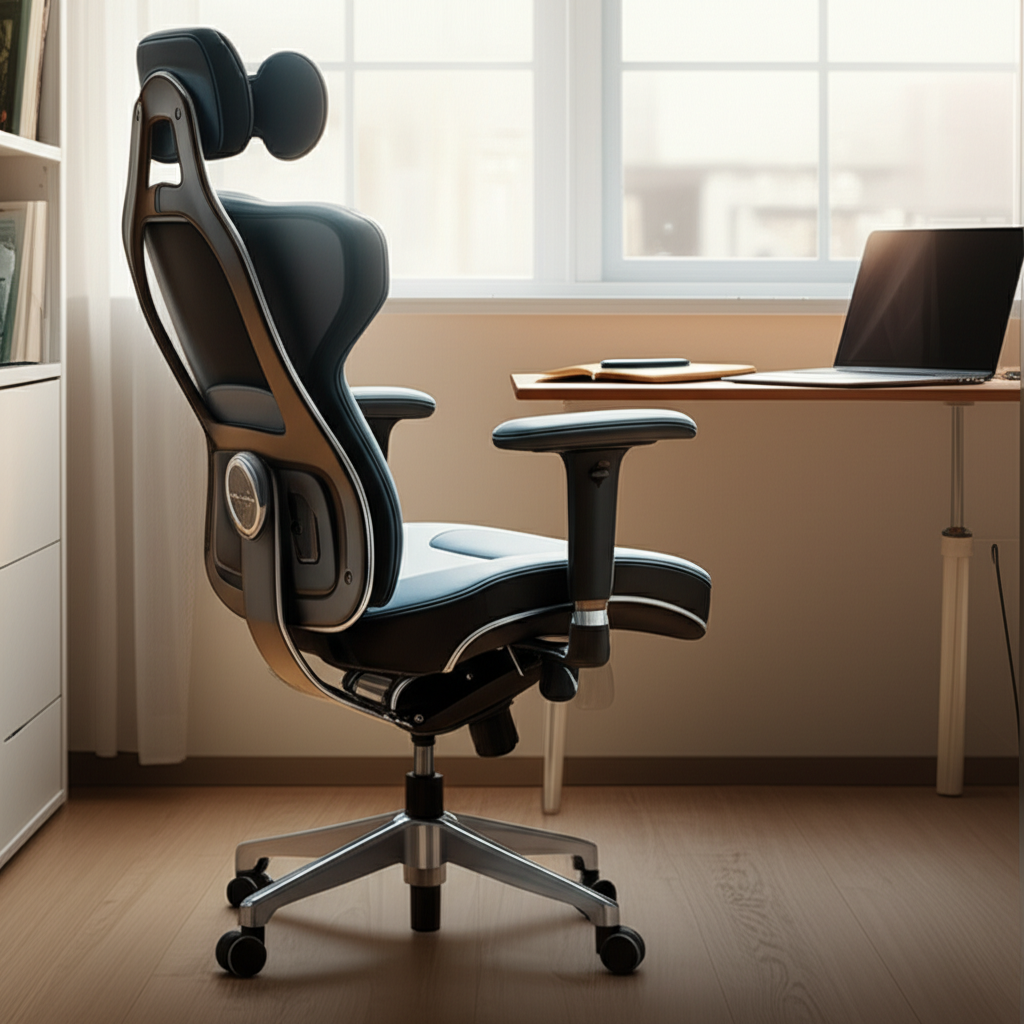
Students spend a significant amount of time sitting. Whether it’s for online classes, writing essays, or researching for projects, their desk chair is a constant companion. A standard, non-adjustable chair often doesn’t fit a student’s body well. This poor fit can lead to slouching, pressure points, and muscle strain.
An adjustable computer chair allows you to customize its settings. You can change the height, armrests, and back support. This personalized fit helps maintain good posture. It also reduces the risk of developing chronic pain from prolonged sitting. Investing in a good chair is an investment in your well-being and academic success.
The Cost of Discomfort: How Poor Seating Affects Students
Ignoring the need for proper seating can have serious consequences. Constant discomfort distracts from learning. It can lead to fatigue, headaches, and a general feeling of being unwell. Over time, poor posture can result in more serious musculoskeletal issues. These can affect students not only during their studies but also in their future lives.
Studies show a direct link between physical comfort and cognitive function. When you’re comfortable, your brain can focus better. You’re more likely to absorb information and perform well on assignments. A study published in the Journal of Ergonomics found that improved ergonomic conditions in student workspaces led to reduced fatigue and increased perceived comfort.
Long-Term Health Benefits of an Adjustable Chair
The benefits of an adjustable computer chair extend far beyond immediate comfort. Correctly supporting your body while sitting helps prevent long-term health problems. This includes back pain, neck strain, and carpal tunnel syndrome. Good posture also promotes better blood circulation. It can even improve breathing and digestion.
By encouraging a neutral spine alignment, these chairs protect your spine’s natural curve. This is vital during formative years when bodies are still developing. Setting up your chair correctly helps build healthy sitting habits that can last a lifetime.
Key Features of an Adjustable Computer Chair for Students
When looking for an adjustable computer chair, several features are essential for student needs. You want a chair that is versatile, durable, and offers good ergonomic support. Not all adjustable chairs are created equal, so knowing what to look for is important.
Consider the specific adjustments available and how they cater to different body types and study habits. A chair that grows with you or adapts to various desk heights can be a valuable long-term investment.
Seat Height Adjustment
This is perhaps the most crucial adjustment. Your feet should rest flat on the floor, with your knees bent at a 90-degree angle. The seat height adjustment allows you to achieve this ideal position. It ensures your thighs are parallel to the ground, reducing pressure on your hamstrings.
Most chairs use a pneumatic lever for easy height adjustment. Ensure the range of adjustment is sufficient for your height and your desk. This prevents you from having to strain upwards or hunch downwards.
Lumbar Support
The lower back, or lumbar region, needs proper support to maintain its natural curve. An adjustable computer chair often comes with built-in or adjustable lumbar support. This can be a fixed curve, a movable cushion, or a system that adjusts in depth and height.
Good lumbar support prevents slouching. It reduces strain on your lower back muscles. This is especially important during long study sessions. Without it, you are more likely to develop lower back pain.
Armrest Adjustability
Adjustable armrests are vital for supporting your arms and shoulders. They help prevent fatigue and strain in your upper body. Ideally, armrests should be adjustable in height and width. This allows your arms to rest comfortably at a 90-degree angle.
Your shoulders should be relaxed, not hunched. Properly adjusted armrests take the pressure off your neck and shoulders. This contributes significantly to overall comfort and focus.
Backrest Angle and Tilt
The backrest should support your entire back. Adjustable backrests allow you to recline slightly. This can relieve pressure on your spine. Some chairs offer a tilt-lock mechanism. This lets you set the backrest at your preferred angle.
A chair that can tilt forward slightly can also be beneficial. This encourages a more upright posture for focused tasks. The ability to adjust the backrest ensures you can find a comfortable position for different activities.
Material and Padding
The material of the chair affects comfort and durability. Mesh chairs offer breathability, which is great for staying cool. Padded chairs with fabric or leather can be more comfortable for some users. Look for high-density foam padding. This provides support without compressing too much over time.
Consider how the material will hold up to daily use. For students, a durable and easy-to-clean material is often a good choice. Mesh is popular for its airflow and comfort.
How to Properly Adjust Your Computer Chair
Setting up your adjustable computer chair correctly is as important as choosing the right one. Even the best chair won’t provide comfort if it’s not adjusted to your body. Follow these simple steps to get your chair perfectly set up. This will maximize its ergonomic benefits.
Take a few minutes to adjust your chair before you start studying. This small effort will pay dividends in comfort and focus throughout your study sessions.
Step-by-Step Adjustment Guide
1. Seat Height: Sit on the chair and place your feet flat on the floor. Adjust the height so your knees are bent at about a 90-degree angle. Your thighs should be parallel to the floor.
2. Backrest Position: Sit back fully into the chair. Ensure your lower back is supported by the lumbar support. Adjust the backrest angle so it supports your spine comfortably. If you can recline, find a slight recline angle that feels natural.
3. Armrest Height: Adjust the armrests so your shoulders are relaxed. Your elbows should be bent at approximately 90 degrees when your arms are resting on them. The armrests should be at a height that supports your forearms without forcing your shoulders up.
4. Depth Adjustment (if applicable): Some chairs allow you to adjust the seat depth. There should be a small gap (about two to three fingers’ width) between the edge of the seat and the back of your knees. This prevents pressure on your legs.
5. Headrest (if applicable): If your chair has a headrest, adjust it to support the natural curve of your neck. It should align with the back of your head. This helps reduce neck strain, especially when reclining.
Common Adjustment Mistakes to Avoid
Many people make common mistakes when adjusting their chairs. One frequent error is setting the seat too high or too low. This can lead to improper knee and hip angles. Another mistake is not utilizing the lumbar support effectively. Some students push their hips too far back, losing lower back support.
Also, ensure your armrests aren’t too high, forcing your shoulders up. Conversely, armrests that are too low offer no support. Take your time and make small adjustments until it feels right.
Best Use Cases for an Adjustable Computer Chair for Students
An adjustable computer chair is incredibly versatile for student life. It’s not just for sitting at a desk for hours. Its adjustability makes it suitable for various study activities and environments. Understanding these use cases can help you appreciate its value fully.
From intense study marathons to quick breaks, the chair adapts to your needs. This makes it an indispensable tool for academic success.
Long Study Sessions and Homework
This is the primary use case. Students often spend many consecutive hours at their desks. An adjustable chair provides the necessary support to maintain good posture and prevent fatigue. The ability to fine-tune the settings means you can adapt the chair as you shift positions or take short breaks.
Comfortable seating reduces distractions. It allows you to stay focused on your work for longer periods. This is crucial for tackling complex assignments and preparing for exams.
Online Classes and Virtual Lectures
With the rise of online education, students spend more time in front of screens for classes. An ergonomic chair ensures comfort and focus during these sessions. Proper support helps you stay engaged and absorb information effectively.
You won’t be fidgeting or shifting due to discomfort. This allows for a more immersive learning experience. It’s like having a dedicated spot in a lecture hall that perfectly fits you.
Gaming and Relaxation
While primarily for study, many adjustable chairs are also great for gaming. The ergonomic features that benefit studying also enhance gaming comfort. This dual functionality makes it a valuable piece of furniture for students.
Some chairs also offer a gentle rocking or recline function. This can be perfect for taking short breaks or relaxing between study sessions. It provides a comfortable place to unwind.
Choosing the Right Adjustable Chair: Factors to Consider
Selecting the right adjustable computer chair involves more than just looking at its features. You need to consider your specific needs, budget, and the chair’s overall build quality. Making an informed decision ensures you get the best value and comfort.
Think of this chair as a long-term study partner. It needs to be reliable and supportive.
Budget and Value
Adjustable computer chairs range widely in price. As a student, your budget might be a significant factor. However, it’s important to balance cost with quality. A very cheap chair might lack durability or proper ergonomic features.
Consider it an investment in your health and academic performance. Look for chairs that offer the best combination of features and durability within your budget. Sometimes, spending a little more upfront can save you money and discomfort in the long run.
Durability and Build Quality
Students can be tough on furniture. Look for chairs made with robust materials. A sturdy base, durable casters, and high-quality upholstery are essential. Check reviews for comments on how well the chair holds up over time.
A well-built chair will last longer. It will continue to provide support and comfort throughout your academic career. Avoid chairs that feel flimsy or unstable.
Size and Space Considerations
Consider the size of the chair relative to your study space. A large, bulky chair might overwhelm a small dorm room. Measure your available space before purchasing. Ensure the chair fits comfortably without blocking pathways.
Also, think about your body size. Some chairs are designed for smaller frames, while others offer a more generous fit. Check the chair’s dimensions and weight capacity to ensure it’s suitable for you.
Maintaining Your Adjustable Chair for Longevity
To ensure your adjustable computer chair provides comfort and support for years, proper maintenance is key. Regular cleaning and occasional checks will keep it in top condition. This protects your investment and ensures it continues to function as intended.
Simple care routines can significantly extend the life of your chair. It also keeps your study space looking and feeling fresh.
Cleaning and Care Tips
Upholstery: Follow the manufacturer’s instructions for cleaning. For fabric chairs, a mild soap and water solution often works. Vacuum upholstery regularly to remove dust and debris. For mesh chairs, a damp cloth is usually sufficient.
Moving Parts: Periodically check that all adjustment levers and mechanisms are working smoothly. You can use a silicone-based lubricant on any squeaky parts, but do so sparingly.
Casters: Keep the casters clean. Hair, dust, and debris can get tangled in them, making it hard to move the chair. You may need to trim away any accumulated debris.
Tighten Screws: Over time, screws can loosen. Periodically check and tighten any loose screws on the chair’s frame or components.
When to Consider an Upgrade
Even with good care, chairs don’t last forever. If your adjustable computer chair starts showing significant signs of wear, such as sagging padding, broken mechanisms, or persistent discomfort, it might be time for an upgrade. Listen to your body; if you’re experiencing increased pain or discomfort despite adjustments, the chair may no longer be providing adequate support.
For students, this often happens after several years of heavy use. Planning for an upgrade before the current chair completely fails can ensure a smooth transition to better seating.
Comparing Ergonomic Chairs vs. Standard Office Chairs for Students
For students, the choice between an ergonomic and a standard office chair is significant. While standard chairs might seem cheaper, they often lack the features needed for healthy, prolonged sitting. Ergonomic chairs are specifically designed to support the body. They adapt to individual needs, which is crucial for students.
Understanding these differences helps in making a wise purchase decision. An ergonomic chair is an investment in comfort and well-being.
Ergonomic Chairs: The Student’s Best Friend
Ergonomic chairs, especially adjustable computer chairs, are built with the human body in mind. They promote good posture and reduce physical stress. Key features like adjustable height, lumbar support, and customizable armrests are standard. These chairs help prevent the common aches and pains associated with long study hours.
They support a neutral spine position, which is vital for preventing long-term musculoskeletal issues. This makes them ideal for students who spend many hours seated.
Standard Office Chairs: Potential Pitfalls
Standard office chairs are often basic. They might offer minimal padding and a fixed backrest. They lack the adjustability needed to cater to different body types or sitting preferences. Sitting in a non-ergonomic chair for extended periods can lead to slouching, back strain, and general discomfort.
While they might be cheaper initially, the long-term health consequences and reduced comfort can outweigh the cost savings for students.
Here’s a quick comparison:
| Feature | Adjustable Ergonomic Chair | Standard Office Chair |
| :————— | :——————————————————– | :————————————————— |
| Height Adj. | Yes, easily adjustable pneumatic system. | Sometimes, or manual adjustment. |
| Lumbar Support | Yes, often adjustable for height and depth. | Rarely, or fixed, non-customizable support. |
| Armrests | Yes, typically adjustable (height, width, pivot). | Often fixed or not adjustable. |
| Backrest | Adjustable angle, tilt lock, sometimes recline. | Fixed angle, limited or no recline. |
| Comfort | High, customizable for prolonged sitting. | Moderate to low, can cause discomfort over time. |
| Health Impact| Reduces strain, promotes good posture, prevents pain. | Can lead to poor posture, back pain, fatigue. |
| Price | Higher initial cost, better long-term value. | Lower initial cost, potential health costs later. |
| Best For | Students, remote workers, anyone spending hours seated. | Short-term use, occasional sitting. |
Frequently Asked Questions About Adjustable Computer Chairs for Students
Q1: Is an adjustable computer chair worth the investment for a student?
Yes, an adjustable computer chair is a valuable investment for students. It promotes better posture, reduces discomfort during long study sessions, and can prevent future health issues. This comfort and support can also improve focus and academic performance.
Q2: What is the most important feature in an adjustable chair for students?
The most important feature is adjustable seat height. This ensures your feet are flat on the floor and your knees are at a 90-degree angle, which is fundamental for good posture. Adjustable lumbar support is also critical for back health.
Q3: How do I know if my chair is adjusted correctly?
Your feet should be flat on the floor with knees at a 90-degree angle. Your back should be supported by the lumbar region. Your armrests should allow your shoulders to be relaxed with elbows at a 90-degree angle.
Q4: Can an adjustable chair help with back pain?
Absolutely. By providing proper lumbar support and encouraging good posture, an adjustable chair can significantly alleviate and prevent back pain caused by prolonged sitting. Customizable settings ensure your spine is supported correctly.
Q5: Are mesh chairs or padded chairs better for students?
Mesh chairs offer excellent breathability, keeping you cool during long sessions. Padded chairs can offer a softer, more cushioned feel. The best choice depends on personal preference and climate. Both can be comfortable if they offer proper ergonomic support.
Q6: How often should I adjust my chair during the day?
It’s beneficial to make small adjustments throughout the day. Shifting your position slightly and readjusting your chair can prevent stiffness and improve circulation. Listen to your body; if you feel uncomfortable, adjust your chair.
Conclusion
For any student navigating the demands of academic life, comfort and health are paramount. An adjustable computer chair isn’t just a piece of furniture; it’s a tool that supports your well-being and enhances your ability to learn. By offering customizable support, it combats the fatigue and pain often associated with long hours of studying. Prioritizing an ergonomic setup, starting with a quality adjustable chair, is a wise decision that pays dividends in both your academic performance and your long-term health.
Make sure to explore options that fit your budget and specific needs. A well-adjusted chair can transform your study experience, making it more productive and enjoyable. Consider checking out resources like Wirecutter’s recommendations for reliable insights into quality office furniture. Investing in your comfort is investing in your success.
