


Published on: September 4, 2025 | Updated on: September 4, 2025
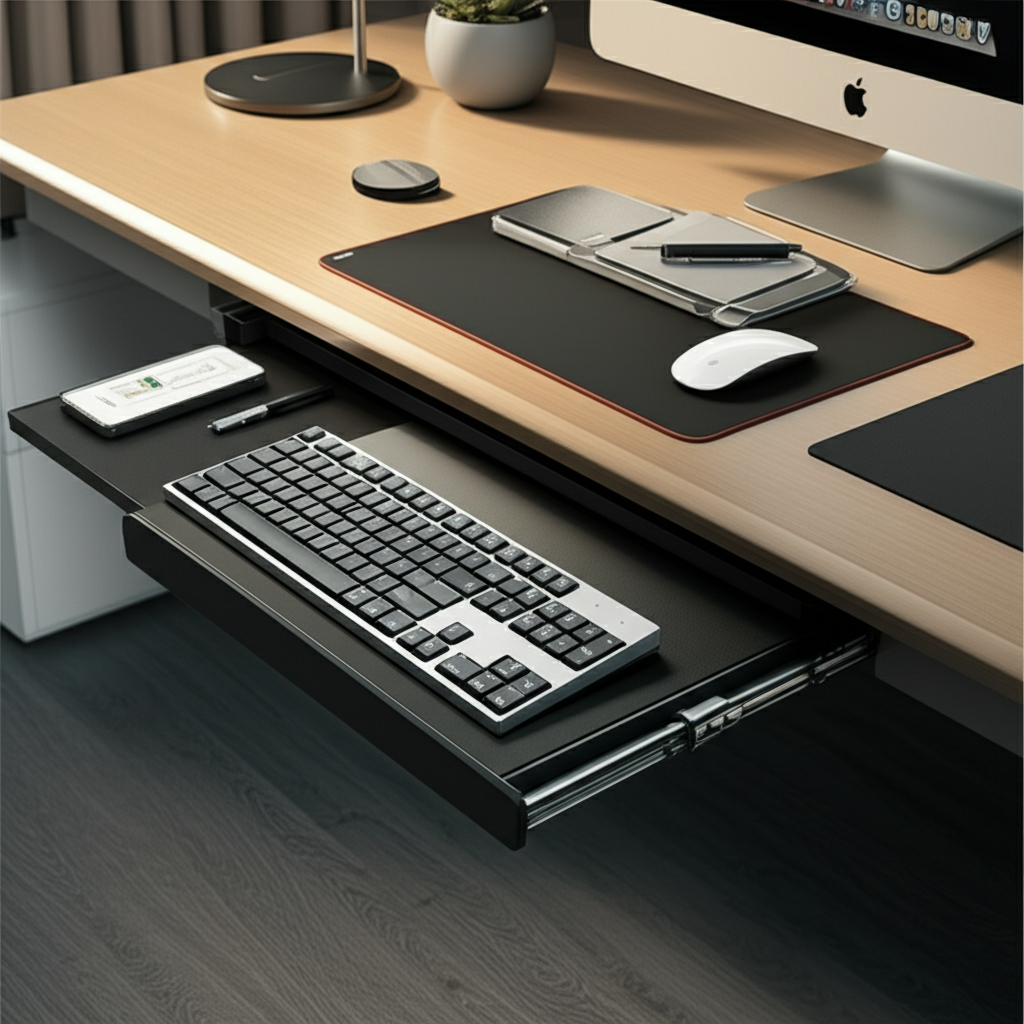
Unlock a clutter-free, ergonomic workspace with an under-desk keyboard drawer. Discover how this simple addition revolutionizes desk organization, boosts productivity, and enhances your overall comfort for a more efficient and stylish home office.
Are you tired of a desk that feels like a chaotic jumble? A messy workspace can be a real productivity killer, leaving you feeling overwhelmed and unfocused. Many of us struggle with keeping our essential tools within reach without creating visual clutter. The good news is that a well-placed under-desk keyboard drawer offers a surprisingly effective solution. It’s a secret weapon for reclaiming your desk surface and bringing order to your work life. Let’s explore how this clever piece of furniture can transform your home office.
The Underrated Power of the Under Desk Keyboard Drawer for Desk Organization

An under-desk keyboard drawer is more than just a place to stash your keyboard and mouse; it’s a strategic tool for achieving superior desk organization. It frees up valuable desk real estate, allowing for a cleaner aesthetic and improved ergonomics. This simple addition can significantly reduce visual distractions, helping you maintain focus on the task at hand.
Why Your Desk Needs an Under Desk Keyboard Drawer: More Than Just Storage
The primary benefit of an under-desk keyboard drawer lies in its ability to declutter your primary workspace. By moving your keyboard and mouse off the desk surface, you create a clean canvas for your monitor, essential documents, and perhaps a plant or two. This visual simplicity is crucial for mental clarity and reducing the stress associated with a messy environment.
Enhancing Ergonomics for Better Health and Productivity
Beyond mere tidiness, an under-desk keyboard drawer plays a vital role in ergonomics. When your keyboard is at the right height, your wrists remain neutral, reducing strain and the risk of repetitive strain injuries like carpal tunnel syndrome. This thoughtful placement supports a healthier posture, which in turn, can lead to sustained productivity throughout your workday.
Neutral Wrist Position: Encourages a straight line from your forearm to your hand, minimizing stress.
Reduced Shoulder and Neck Strain: By allowing a more natural arm position, it can alleviate tension in the upper body.
Improved Comfort: Long work sessions become more bearable when your setup is comfortable.
Maximizing Desk Space for a Clutter-Free Zone
Think about all the space your keyboard and mouse occupy on your desk. An under-desk drawer effectively doubles the usable surface area, transforming a cramped desk into an expansive workspace. This reclaimed space is perfect for writing notes, spreading out documents, or simply enjoying a less-crowded environment.
Clearer Desk Surface: Ideal for tasks requiring physical space, like sketching or reading physical documents.
Aesthetically Pleasing: Contributes to a minimalist and organized look that many home office enthusiasts strive for.
Easier Cleaning: A less cluttered desk is much quicker and easier to wipe down and keep tidy.
The Psychological Impact of an Organized Workspace
The state of our workspace often mirrors our mental state. A tidy desk can foster a sense of control, calm, and focus. Conversely, a cluttered desk can contribute to feelings of overwhelm and anxiety. Implementing an under-desk keyboard drawer is a tangible step towards creating a more positive and productive work environment.
Reduced Visual Clutter: Less distraction leads to better concentration.
Sense of Accomplishment: Tidying up can provide a psychological boost.
Professionalism: Even in a home office, a well-organized space can make you feel more professional.
Types of Under Desk Keyboard Drawers: Finding Your Perfect Fit
Not all under-desk keyboard drawers are created equal. They come in various styles, materials, and mounting mechanisms, each offering different advantages. Choosing the right type depends on your desk, your needs, and your personal style.
Freestanding vs. Mounted Drawers
Freestanding drawers often sit on the desk surface and are slid underneath, offering portability but taking up some desk space. Mounted drawers, on the other hand, attach directly to the underside of your desk, maximizing surface area and providing a more integrated look.
| Drawer Type | Pros | Cons | Best For |
| :———— | :—————————————————— | :————————————————— | :—————————————————————————– |
| Freestanding | No installation required, portable | Takes up desk space, can slide around | Rented spaces, desks you can’t modify, temporary setups |
| Mounted | Maximizes desk space, secure, integrated look | Requires installation, might not be suitable for all desks | Permanent home offices, those seeking a clean aesthetic, desks that can be drilled |
| Clamp-on | No drilling required, adjustable, easy installation | Might not fit all desk edges, can be less sturdy | Desks where drilling isn’t an option, adjustable height desks |
Material and Design Considerations
Under-desk keyboard drawers are commonly made from wood, metal, or durable plastic. The material choice impacts durability, aesthetics, and weight. Consider the weight capacity if you plan to store more than just your keyboard and mouse.
Wood: Offers a classic, warm look and can be very sturdy.
Metal: Durable, sleek, and often lightweight, suitable for modern aesthetics.
Plastic: Budget-friendly and lightweight, but can be less durable.
Features to Look For: Beyond Basic Storage
Many drawers come with added features that enhance their utility. Look for adjustable height, tilt functionality, built-in cable management, and ergonomic wrist rests. These features can significantly improve your comfort and further refine your desk organization.
Adjustable Height/Tilt: Crucial for achieving perfect ergonomic alignment.
Cable Management: Keeps wires tidy and out of sight, contributing to a clean look.
Wrist Rest: Provides extra comfort during long typing sessions.
Locking Mechanism: Offers security for sensitive equipment.
How to Install an Under Desk Keyboard Drawer: A Step-by-Step Guide
Installing a mounted under-desk keyboard drawer is usually a straightforward process. Most come with pre-drilled holes and all the necessary hardware. Always read the manufacturer’s instructions carefully before you begin.
Preparation is Key: Tools and Workspace
Before you start, ensure you have the right tools. Typically, you’ll need a drill with appropriate bits, a measuring tape, a pencil, and a screwdriver. Clear the area beneath your desk to give yourself ample working space.
Tools Needed: Drill, drill bits, measuring tape, pencil, screwdriver, level (optional).
Workspace Prep: Clear the floor under your desk, ensure good lighting.
Measuring and Marking for Precision
Accurate placement is crucial for both functionality and aesthetics. Measure the dimensions of the drawer and determine the ideal position under your desk. Use a pencil to lightly mark the mounting points. A level can help ensure the drawer is installed straight.
Center the Drawer: Find the center of your desk’s underside and align the drawer accordingly.
Consider Legroom: Ensure the drawer doesn’t interfere with your seating position or leg movement.
Drilling and Mounting the Drawer
Carefully drill pilot holes at your marked locations. Then, position the drawer and secure it using the provided screws. Double-check that the drawer slides smoothly before fully tightening all fasteners.
Pilot Holes: Prevents wood splitting and makes screw insertion easier.
Secure Fastening: Ensure all screws are snug but not overtightened, which could damage the desk.
Testing and Cable Management
Once mounted, test the drawer’s sliding mechanism. If it feels stiff or wobbly, check the screws or consider if the desk surface is perfectly level. If your drawer has cable management features, use them to route your keyboard and mouse cables neatly. This is a key step in achieving true desk organization with your new drawer.
Smooth Operation: The drawer should glide in and out effortlessly.
Cable Routing: Tuck away wires for a cleaner look and to prevent snagging.
Optimizing Your Desk Organization with an Under Desk Keyboard Drawer
Simply installing the drawer is the first step. True genius lies in how you integrate it into your overall desk organization strategy. Think about what else can be stored or managed using this new space.
Beyond the Keyboard: Smart Storage Solutions
Your under-desk drawer can be a hub for more than just your input devices. Consider storing seldom-used items like spare cables, a portable hard drive, or even a small notepad. This keeps your desk surface clear and your essentials accessible.
Vertical Organizers: Small bins or dividers can be placed inside the drawer to categorize items.
Cable Sleeves: Bundle extra cables together for a neater appearance within the drawer.
Document Holders: Slim document holders can fit to keep important papers organized.
Integrating with Your Existing Workspace
The goal is a cohesive and functional setup. Consider how the drawer complements your monitor stand, ergonomic chair, and any other desk accessories. A unified look enhances the overall aesthetic and can boost your productivity.
Ergonomic Chair Pairing: Ensure the drawer height allows your chair to be positioned correctly.
Monitor Placement: A clear desk surface from the drawer allows for optimal monitor positioning.
Lighting: Proper desk lighting is essential for reducing eye strain and should complement the new layout. Learn more about ergonomic desk lighting.
The Art of Cable Management: A Deeper Dive
Cable clutter is the enemy of a clean desk. Utilize the space under your desk and within your drawer to manage wires effectively. Cable clips, ties, and sleeves can work wonders. Some drawers even come with built-in grommets or channels for this purpose.
Under-Desk Cable Trays: These attach to the underside of your desk and can hold power strips and excess cables.
Velcro Straps: Reusable and easy to adjust for bundling cables.
Adhesive Cable Clips: Stick to the underside of the desk or the drawer for routing individual cables.
Elevating Your Home Office: Beyond the Drawer
While the under-desk keyboard drawer is a fantastic starting point, a truly optimized home office involves a holistic approach. Think about other elements that contribute to productivity and well-being.
The Importance of Ergonomic Seating
Pairing your under-desk keyboard drawer with an ergonomic chair is crucial for a truly comfortable and healthy workspace. An adjustable chair that supports your back and allows your feet to rest flat on the floor is essential. This combination creates a foundation for long, productive work sessions without discomfort.
Lumbar Support: An adjustable lumbar support is key for spinal health.
Armrest Adjustability: Should complement the height and position of your keyboard and desk.
Seat Depth: Ensure your thighs are comfortably supported without pressure behind the knees.
Lighting and Ambiance for Productivity
The right lighting can significantly impact your mood and focus. Natural light is ideal, but task lighting is also important. Consider a desk lamp that provides adjustable brightness and color temperature to suit different times of the day and tasks. The clean desk enabled by your drawer makes integrating good lighting easier.
Natural Light: Position your desk to maximize window light without glare on your screen.
Task Lighting: A good desk lamp illuminates your immediate work area.
Ambient Lighting: Softer, indirect light can reduce eye strain and create a pleasant atmosphere.
Minimalist Desk Setups and Your Under Desk Drawer
The under-desk keyboard drawer is a cornerstone of minimalist desk setups. By clearing the surface, it embodies the principle of “less is more.” Embrace this by keeping only essential items on your desk and utilizing the drawer for everything else. This approach fosters focus and a sense of calm.
Declutter Ruthlessly: Remove anything that doesn’t serve a purpose or bring joy.
Curate Essentials: Keep only the items you use daily on your desk surface.
Utilize Drawer Space: Store accessories, stationery, and less frequently used items here.
Maintaining Your Organized Workspace: Long-Term Strategies
Desk organization is not a one-time event; it’s an ongoing practice. Regularly tidying up and refining your system will ensure your under-desk keyboard drawer continues to be an effective tool.
The Power of Daily and Weekly Tidying
Dedicate a few minutes at the end of each workday to put items back in their designated places. This includes sliding your keyboard and mouse into the drawer. A quick weekly tidy-up can involve dusting, organizing the drawer’s contents, and ensuring cables remain neat.
End-of-Day Routine: Spend 5 minutes clearing your desk and securing items.
Weekly Reset: A more thorough clean and reorganization of your drawer and desk space.
Adapting Your Setup as Needs Change
Your work habits and needs may evolve. Perhaps you switch to a laptop or need to accommodate new peripherals. Be prepared to adjust your under-desk drawer setup and organization strategy accordingly. Flexibility is key to long-term success.
Re-evaluate Regularly: Does your current setup still meet your needs?
Seasonal Adjustments: Consider if different items need to be stored or accessed more frequently.
Digital Organization as a Complement
While physical organization is vital, don’t forget digital decluttering. A tidy digital space can mirror the calm of a tidy physical desk. Organize your files, manage your inbox, and utilize productivity apps to enhance your overall efficiency.
File Management: Create a logical folder structure for your documents.
Email Inbox: Implement strategies for managing and reducing email clutter.
Desktop Icons: Keep your computer desktop clean and free of unnecessary shortcuts.
Common Issues and Troubleshooting with Under Desk Keyboard Drawers
Even the best solutions can encounter minor hiccups. Here are some common issues you might face with an under-desk keyboard drawer and how to resolve them.
Drawer Sticking or Not Sliding Smoothly
This can happen due to misaligned mounting, debris in the tracks, or overtightened screws.
Check Alignment: Ensure the drawer is installed perfectly level and square.
Clean Tracks: Remove any dust, hair, or small objects from the drawer slides.
Adjust Screws: Slightly loosen screws if they seem to be binding the mechanism.
Insufficient Space or Fit Issues
Sometimes, the drawer might not fit as expected, or there isn’t enough legroom.
Measure Carefully: Always measure your desk and intended space before purchasing.
Consider Alternatives: If a mounted drawer doesn’t work, explore clamp-on or freestanding options.
Desk Modification: For some, minor desk modifications might be an option (with caution).
Weight Capacity Concerns
If you’re tempted to store heavy items in your drawer, be mindful of its weight limit.
Check Specifications: Always refer to the manufacturer’s weight capacity.
Distribute Weight: If possible, distribute heavier items evenly within the drawer.
Use for Lighter Items: Prioritize storing your keyboard, mouse, and perhaps some papers or small accessories.
The Cost-Benefit Analysis: Is an Under Desk Keyboard Drawer Worth It?
Investing in an under-desk keyboard drawer is an investment in your productivity, comfort, and well-being. The cost is typically modest compared to the benefits of a cleaner, more ergonomic workspace.
Budget-Friendly Options vs. Premium Features
You can find basic, functional under-desk drawers for under $50, while premium models with advanced features can range from $100 to $200 or more. The value lies in finding a drawer that meets your specific needs and budget.
Budget: Focus on durability and smooth operation.
Mid-Range: Look for features like adjustable tilt and better cable management.
Premium: Expect high-quality materials, integrated features, and superior ergonomics.
Long-Term Value and Productivity Gains
The initial cost is quickly offset by the gains in productivity and the prevention of potential discomfort or injury. A more organized and ergonomic setup can lead to fewer distractions and more focused work, ultimately boosting your output.
Reduced Distractions: More focused work time translates to higher output.
Ergonomic Benefits: Fewer discomforts mean fewer breaks and sustained work.
Improved Workflow: Having everything organized and accessible speeds up tasks.
Frequently Asked Questions About Desk Organization with Under Desk Keyboard Drawer
Q1: How do I choose the right size under desk keyboard drawer?
Measure the available space beneath your desk, considering both the width and depth. Also, ensure there’s enough clearance for your legs and chair. Check the dimensions of the drawer itself against these measurements.
Q2: Can I install an under desk keyboard drawer on any type of desk?
Most mounted drawers are designed for solid wood or particleboard desks. Desks with metal frames or glass surfaces might require specialized mounting solutions or clamp-on/freestanding options. Always check compatibility before purchasing.
Q3: How high should my keyboard be with an under desk drawer?
Your keyboard should be positioned so that your elbows are bent at roughly a 90-degree angle when typing, with your wrists straight and relaxed. Many drawers offer adjustability to help you achieve this perfect ergonomic height.
Q4: What else can I store in my under desk keyboard drawer besides my keyboard and mouse?
You can store items like spare cables, a USB hub, a small notebook, pens, a portable charger, or any other small office supplies you want to keep off your desk surface. Vertical organizers can help keep these items tidy.
Q5: Are under desk keyboard drawers difficult to install?
For mounted drawers, installation typically involves basic tools like a drill and screwdriver. Most come with clear instructions and pre-drilled holes. Clamp-on and freestanding drawers require even less effort.
Q6: Will an under desk keyboard drawer help with cable management?
Yes, many drawers have built-in features like cable clips or channels. Even without these, the drawer itself provides a discreet space to tuck away excess cables, contributing significantly to a clutter-free setup.
Q7: What is the main benefit of using an under desk keyboard drawer for desk organization?
The primary benefit is freeing up valuable desk surface space, leading to a cleaner, more organized, and visually less cluttered workspace. This enhances focus, reduces distractions, and improves overall productivity and comfort.
Conclusion: Embrace the Genius of Under Desk Organization
Implementing an under-desk keyboard drawer is a powerful, yet simple, strategy for transforming your home office. It’s a key component in achieving superior desk organization, enhancing your ergonomics, and boosting your productivity. By reclaiming your desk surface, you create a more focused and calming environment, which is essential for sustained work and well-being. Don’t underestimate the impact this one addition can have on your daily workflow and overall comfort. Embrace the genius of under desk organization and elevate your workspace today.
