


Published on: September 11, 2025 | Updated on: September 11, 2025
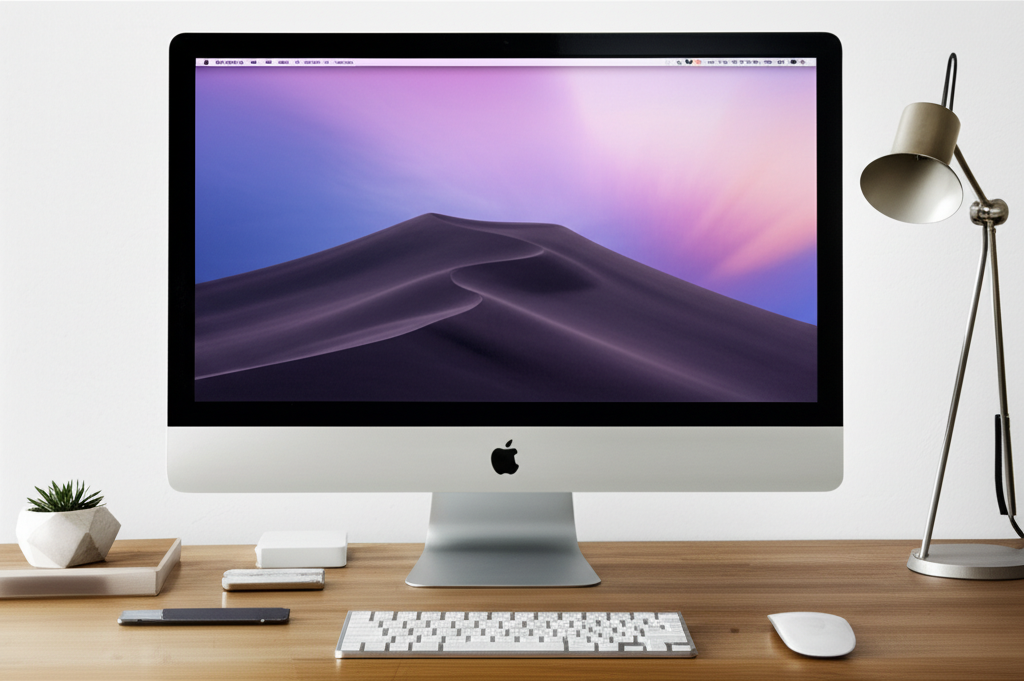
Achieve the ultimate minimalist iMac desk setup for peak productivity and serene aesthetics. Discover essential genius in decluttering, organizing, and optimizing your workspace for focus and flow.
The allure of a minimalist iMac desk setup is undeniable. It promises a sanctuary of calm amidst the digital chaos, a space where your iMac can shine, and your productivity can soar. Yet, for many, achieving this vision feels like chasing a phantom. Cables proliferate, clutter accumulates, and the serene workspace remains a distant dream. I understand this frustration intimately. This guide is crafted to demystify the process, offering practical, actionable steps to transform your desk into an oasis of focused efficiency.
Why a Minimalist iMac Desk Setup Matters

A well-designed minimalist iMac desk setup is more than just an aesthetic choice; it’s a strategic investment in your well-being and output. By reducing visual distractions and optimizing your workspace, you create an environment conducive to deep work and sustained concentration. This deliberate approach minimizes mental clutter, allowing your creative and analytical energies to flow unimpeded.
The Core Principles of Minimalist Design for Your Workspace
Minimalism, at its heart, is about intentionality and the removal of the superfluous. For your iMac desk, this translates to selecting only what is essential and ensuring each element serves a purpose, both functionally and aesthetically. It’s about creating harmony through thoughtful curation.
Decluttering: The First Step to Serenity
Before adding anything new, the most crucial step is ruthless decluttering. Every item on your desk should earn its place. This process involves assessing each object for its necessity, frequency of use, and contribution to your workflow or overall workspace ambiance.
Ruthlessly Purge Unnecessary Items
Go through every drawer, surface, and even the digital desktop. Ask yourself if an item genuinely supports your work or brings you joy. If not, it’s time to let it go, donate it, or store it elsewhere.
Cable Management: The Unsung Hero
Visible cables are the antithesis of a minimalist setup. Invest in cable sleeves, ties, or clips to bundle and conceal them. Consider a desk with built-in cable management solutions for a truly seamless look.
Essential iMac Desk Components
A minimalist setup doesn’t mean sparse; it means smart. Focus on high-quality, functional pieces that complement your iMac and enhance your workflow. These are the cornerstones of your productive haven.
The iMac Itself: A Statement Piece
Your iMac is likely the centerpiece. Embrace its sleek design by keeping the area around it clear. Consider a monitor arm to free up desk space and improve ergonomics.
Ergonomic Keyboard and Mouse
Comfort is paramount for long work sessions. Choose slim, aesthetically pleasing keyboards and mice that align with your minimalist sensibilities. Wireless options further reduce cable clutter.
Essential Accessories: Less is More
Think about what you truly need daily. A quality notepad, a pen, perhaps a small plant for a touch of life, and a discreet desk lamp are usually sufficient.
Optimizing for Productivity: Beyond Aesthetics
While beauty is a key component, a minimalist desk setup must also be highly functional. Every choice should enhance your ability to focus and perform at your best. This involves understanding your personal workflow and adapting the space accordingly.
The Power of Vertical Space
When horizontal space is limited, look up. Wall-mounted shelves, monitor risers with storage, or pegboards can house essentials without encroaching on your primary work surface. This keeps your main desk clear and organized.
Smart Storage Solutions
Even in minimalism, some items need to be stored. Opt for sleek, hidden storage solutions like drawer organizers, minimalist boxes, or a small, well-designed filing cabinet. The goal is to keep clutter out of sight.
Ergonomics: The Foundation of a Healthy Workspace
A beautiful desk is only effective if it supports your physical well-being. Investing in ergonomic solutions prevents strain and promotes better posture, allowing you to work comfortably for extended periods.
The Right Chair: Your Throne of Productivity
An ergonomic chair is non-negotiable for any serious home office. Look for adjustable lumbar support, armrests, and seat height. A clean, modern design will seamlessly integrate into your minimalist aesthetic.
Desk Height and Monitor Positioning
Ensure your desk is at an appropriate height to allow your elbows to rest at a 90-degree angle while typing. Your monitor should be at eye level to prevent neck strain. A monitor arm is an excellent tool for achieving this.
Lighting: Setting the Mood and Enhancing Focus
Proper lighting is crucial for reducing eye strain and creating a pleasant working atmosphere. A minimalist setup often incorporates layered lighting for different needs.
Natural Light: The Ultimate Accessory
Position your desk to take advantage of natural light. Avoid direct glare on your screen by angling your setup or using sheer curtains. Natural light boosts mood and reduces reliance on artificial sources.
Task and Ambient Lighting
A good desk lamp provides focused light for reading or detailed work. Ambient lighting, such as a soft floor lamp or diffused ceiling light, creates a calming atmosphere. Choose fixtures with clean lines and materials that match your décor.
Integrating Technology Seamlessly
Technology is essential, but in a minimalist setup, it should blend in rather than stand out. Focus on devices that are not only functional but also aesthetically pleasing and designed for a clutter-free experience.
Wireless Peripherals and Charging
Embrace wireless keyboards, mice, and headphones to eliminate cord clutter. Wireless charging pads for your phone and other devices further streamline your desk surface.
Docking Stations and Hubs
To connect multiple peripherals to your iMac without a spaghetti of wires, a sleek docking station or USB-C hub is invaluable. Look for models with minimalist designs that can be discreetly placed.
Décor and Personal Touches: Adding Personality Without Clutter
Minimalism doesn’t mean sterile. It’s about incorporating elements that inspire and bring joy, chosen with intention. These touches make your workspace uniquely yours.
Strategic Use of Color and Texture
A neutral color palette often forms the base of a minimalist design. Introduce subtle pops of color or interesting textures through a desk mat, a small rug, or decorative items.
Plants and Natural Elements
Bringing nature indoors can significantly boost mood and reduce stress. A small, low-maintenance plant like a succulent or a snake plant adds life and a touch of organic beauty.
Art and Inspiration
A single, well-chosen piece of art or a framed inspirational quote can add personality. Ensure it complements your overall aesthetic and doesn’t create visual noise.
Building Your Minimalist iMac Desk Setup: A Step-by-Step Guide
Let’s bring it all together. Here’s a practical approach to creating your ideal minimalist iMac desk setup.
1. Assess Your Current Space: Identify what’s working and what isn’t. Note down all items on your desk and their frequency of use.
2. Declutter Aggressively: Remove anything not essential for your daily workflow.
3. Invest in Key Ergonomic Pieces: Prioritize a good chair and ensure proper monitor height.
4. Implement Cable Management: Tame those unruly cords for a cleaner look.
5. Select Essential Accessories: Choose only high-quality, functional items that enhance your work.
6. Optimize Lighting: Ensure you have adequate natural and artificial light sources.
7. Add Personal Touches: Incorporate elements that inspire you without adding clutter.
8. Regular Maintenance: Schedule brief weekly tidy-ups to maintain the minimalist ideal.
The Benefits of a Well-Curated iMac Workspace
A minimalist iMac desk setup offers a multitude of benefits that extend beyond mere aesthetics. It directly impacts your mental state and, consequently, your work performance.
Enhanced Focus and Concentration
By removing visual distractions, your brain is free to concentrate on the task at hand. This leads to deeper work sessions and higher quality output.
Reduced Stress and Anxiety
A cluttered environment often translates to a cluttered mind. A clean, organized space promotes a sense of calm and control, reducing stress.
Improved Workflow Efficiency
When everything has its place and is easily accessible, you spend less time searching for items and more time working. This streamlined process boosts overall efficiency.
Boosted Creativity and Inspiration
A serene environment can be incredibly conducive to creative thinking. It allows ideas to surface more readily without being drowned out by visual noise.
A More Enjoyable Work Experience
Ultimately, spending your workday in a space that is both beautiful and functional makes the entire experience more pleasant and motivating.
Frequently Asked Questions About Minimalist iMac Desk Setups
Here are some common questions I hear from people embarking on their minimalist desk journey.
What are the absolute must-have items for a minimalist iMac desk setup?
The essentials typically include your iMac, an ergonomic keyboard and mouse, a comfortable chair, and effective cable management. Beyond that, focus on items that directly support your daily tasks and bring you inspiration without adding clutter.
How can I manage cables effectively without buying too many accessories?
Simple solutions like Velcro cable ties, binder clips attached to the desk edge, or even rubber bands can work wonders. Grouping cables together and running them along the back or underside of your desk is key.
Is a standing desk compatible with a minimalist iMac setup?
Absolutely! Many standing desks have minimalist designs and integrated cable management systems. They promote health benefits and can be a fantastic addition to a focused workspace.
How often should I declutter my minimalist desk?
A quick tidy-up daily or every few days is usually sufficient to maintain the aesthetic. A more thorough decluttering session once a month or quarterly can help prevent clutter creep.
What if I need a lot of physical documents or tools for my work?
Even with extensive needs, a minimalist approach is possible. Utilize discreet storage solutions like stylish boxes, drawer organizers, or wall-mounted shelving. The goal is to keep your primary desk surface clear.
Can I incorporate color and personality into a minimalist desk?
Yes, minimalism isn’t about blandness. Use color strategically in a few key items, like a desk mat, a piece of art, or a plant pot. Textures and natural materials also add warmth and personality.
Conclusion: Embrace the Genius of Less
Creating a minimalist iMac desk setup is an empowering journey towards a more focused, productive, and serene work life. It’s about making conscious choices, prioritizing function and form, and curating a space that truly serves you. By embracing the principles of minimalism, you unlock a new level of efficiency and well-being. Your iMac desk setup can be more than just a place to work; it can be a sanctuary that inspires your best thinking. Start small, be intentional, and discover the essential genius that lies in less.
