


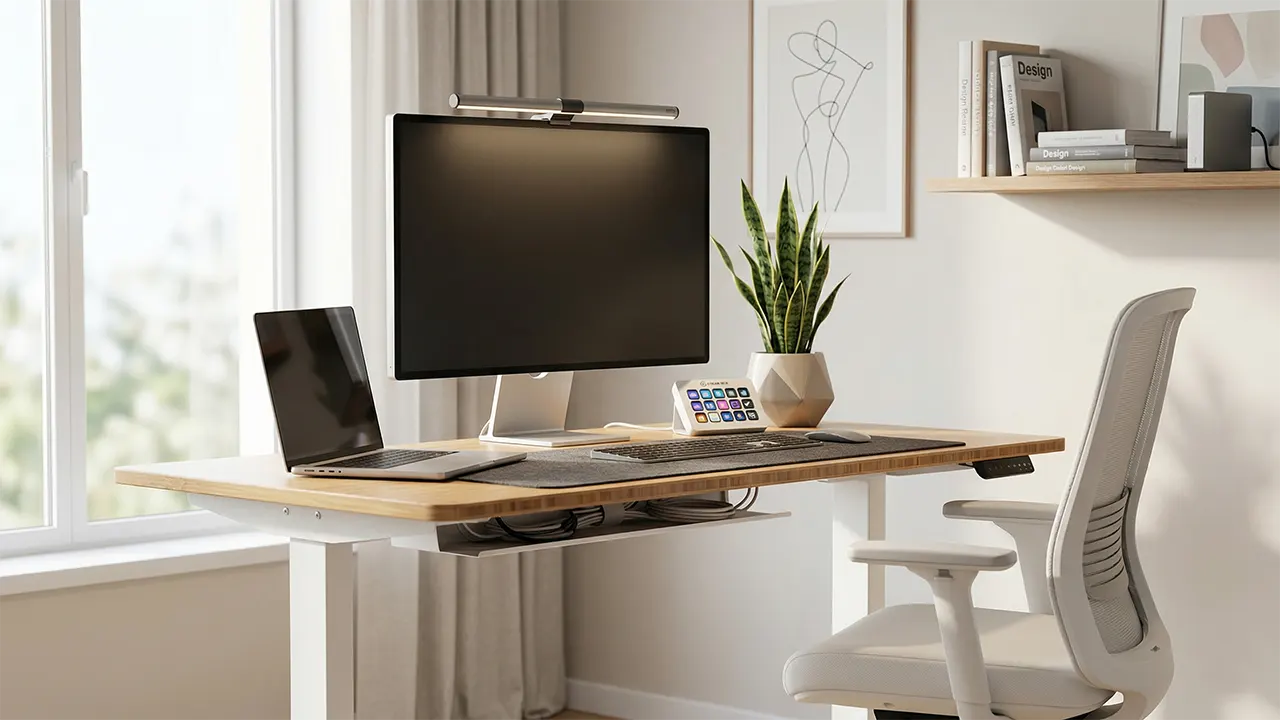
A minimalist workspace helps you focus, think clearly, and create better work. It removes visual noise, keeps only what you need, and turns your desk into a tool for deep work. In this guide, you will learn step by step how to decorate a minimalist workspace for creators, means how to build a clean, aesthetic, and functional setup made for creators.
Imagine sitting at your desk with nothing distracting you. No messy cables. No random items. Just your tools, placed with purpose. That is the goal here. We will not just decorate your desk. We will build a system that supports your creativity every day.
What You Will Need (Tools & Setup Basics)
You do not need many things to create a minimalist workspace. You only need the right things. Each item must serve a clear purpose and reduce effort while you work.
- A clean desk (preferably with storage)
- A comfortable ergonomic chair
- Proper lighting (soft and focused)
- Basic cable management tools
- 1–2 intentional decor items
- A simple color palette (white, beige, grey, wood tones)
Expert insight: Minimalism is not about having less. It is about removing what does not help your work. Keep only what improves your output.
Step-by-Step: How to Decorate a Minimalist Workspace for Creators
This is the core transformation. Follow these steps in order. Each step builds on the previous one.
Step 1: Clear Everything (Reset Your Space)
Start by removing everything from your desk. Yes, everything. This gives you a clean starting point.
- Take off all items from the desk
- Clean the surface fully
- Sort items into: Keep / Store / Remove
This step feels simple, but it is powerful. You cannot build a clean system on top of clutter.
Minimalism starts with removal, not addition.
Step 2: Build the Surface Layer (What You See)
The surface layer is your visible workspace. This is where minimalism matters most.
- Place only your primary tools (laptop, monitor, keyboard)
- Keep spacing between items
- Avoid stacking objects
Use a neutral base. White or wood desks work best. Add one texture like a felt mat or wood surface to make it warm.
Creator tip: If you use multiple tools, keep only the one you need for your current task on the desk.
Step 3: Optimize the Function Layer (What You Use)
This layer includes tools you use daily. Arrange them for speed and comfort.
- Keep frequently used items within arm reach
- Store rarely used tools out of sight
- Use drawers or trays for small items
Think like a creator. If you design, keep your tablet close. If you write, keep your notebook ready. Your setup should match your workflow.
Your workspace should reduce friction, not add steps.
Step 4: Hide the Hidden Layer (Clutter Control)
This is where most setups fail. Clutter is not removed. It is just hidden badly. You need a proper system.
- Use drawers for cables and accessories
- Install under-desk cable trays
- Use boxes or organizers for storage
A clean desk is only possible when storage is planned. Without this, clutter comes back fast.
Step 5: Set Up Lighting (Focus + Comfort)
Lighting affects your focus more than you think. Bad lighting causes eye strain and reduces productivity.
- Use a soft warm desk lamp
- Avoid harsh overhead lighting
- Position light to reduce screen glare
For creators working long hours, lighting is not optional. It directly affects your energy and output.
Step 6: Add Intentional Decor (Not Decoration)
You do not need many decor items. You need the right ones.
- Add one plant (snake plant or small succulent)
- Use one artwork or framed piece
- Choose natural materials like wood or fabric
Too many items break the minimalist feel. Keep it simple.
One meaningful object is stronger than ten random ones.
Recommended Minimalist Desk Setup for Creators (Real Examples)
This setup shows how you can combine the right tools to create a clean, functional workspace. These are not random picks. Each item solves a specific problem creators face.
1. Desk: FlexiSpot E6 Standing Desk

A good desk is the foundation. The FlexiSpot E6 Bamboo Standing Desk gives you both sitting and standing options.
- Clean bamboo surface adds warmth
- Adjustable height supports long work hours
- Minimal design fits any setup
Why it matters: Creators sit for long hours. This desk helps you switch posture and stay productive.
2. Chair: Branch Ergonomic Chair

Your chair affects your health. The Branch Ergonomic Chair supports your back without adding visual bulk.
- Simple, clean design
- Strong lumbar support
- Fits minimalist setups
Why it matters: Comfort improves focus. Pain kills creativity.
3. Lighting: BenQ ScreenBar Halo

Lighting should not take desk space. The BenQ ScreenBar Halo sits on top of your monitor.
- No desk clutter
- Reduces eye strain
- Provides even light
Why it matters: Better lighting means longer, more comfortable work sessions.
4. Creator Tool: Elgato Stream Deck MK.2

For creators, speed matters. The Elgato Stream Deck MK.2 helps you control tools with one tap.
- Automates repetitive tasks
- Keeps workflow smooth
- Matches minimalist white setups
Why it matters: It reduces clicks and saves time during creation.
5. Organization: Under-Desk Cable Tray

Cable clutter breaks minimalism. The Mzmaxy Cable Management Tray hides cables cleanly.
- Keeps wires out of sight
- Makes desk look clean instantly
- Easy to install
Why it matters: Visual clutter reduces focus.
6. Surface: Felt Desk Mat

A desk mat adds warmth. The DAWNTREES Felt Desk Mat softens the look of your desk.
- Adds texture
- Protects desk surface
- Keeps setup cohesive
Why it matters: Minimal does not mean cold. Texture adds comfort.
Troubleshooting Common Problems
Even after setting up, problems can appear. Most creators face the same issues. Fix them early to keep your workspace clean and functional.
Problem 1: Desk Gets Messy Again
This happens when your system is weak. You added items without planning storage.
- Fix: Remove unused items weekly
- Fix: Add hidden storage (drawers or boxes)
Problem 2: Setup Feels Too Empty
Minimalism can feel cold if done wrong.
- Fix: Add one plant or warm material
- Fix: Use soft lighting instead of harsh light
Problem 3: Poor Ergonomics
Aesthetic is useless if your body hurts.
- Fix: Adjust chair height and monitor level
- Fix: Keep screen at eye level
Quick reminder: A good workspace should feel comfortable first, beautiful second.
Pro Tips for the Best Minimalist Workspace Setup
A great minimalist workspace is not just clean. It works with your habits and helps you stay consistent every day. These tips will help you maintain and improve your setup over time.
1. Use the “One Task, One Tool” Rule
Keep only the tool you need for your current task on the desk. Remove everything else.
- Writing → keep laptop + notebook
- Design → keep tablet + stylus
- Editing → keep keyboard + monitor setup
This reduces distraction and improves focus instantly.
2. Reset Your Desk Daily
At the end of each day, take 2 minutes to reset your desk.
- Put items back in place
- Clear unnecessary objects
- Wipe the surface
This keeps your system stable and prevents clutter buildup.
3. Follow the 80% Empty Rule
Your desk should never feel full. Keep at least 70–80% of the surface empty.
Empty space is not wasted space. It is thinking space.
4. Match Setup with Your Creative Flow
Your workspace should adapt to how you work, not the other way around.
- Morning thinkers → keep notebook ready
- Night creators → focus on warm lighting
- Video creators → keep gear within reach
Safety and Ergonomics Essentials
Your minimalist workspace must support your body. Long hours of work can cause pain if your setup is wrong. Focus on comfort and posture first.
- Keep monitor at eye level
- Place keyboard at elbow height
- Keep feet flat on the floor
- Maintain straight back posture
Take short breaks every 45–60 minutes. Stretch your body and rest your eyes.
A beautiful workspace is useless if it harms your body.
When to Upgrade Your Workspace
You do not need to upgrade often. But some signs show your setup is limiting your work.
- You feel discomfort after short work sessions
- Your tools slow down your workflow
- Your desk feels crowded even after organizing
Upgrade only when needed. Do not chase trends. Focus on function.
Frequently Asked Questions (FAQ)
1. How do I start a minimalist workspace at home?
Start by clearing your desk completely. Add back only essential tools. Use simple colors and keep the surface clean. Focus on function first, then add small decor if needed.
2. What colors work best for a minimalist office desk setup?
Neutral colors work best. Use white, beige, grey, or wood tones. These colors reduce visual distraction and help you stay focused.
3. What are the best minimalist desk accessories?
Choose simple and useful items like a desk mat, cable organizers, and a clean desk lamp. Avoid decorative items that do not serve a purpose.
4. How can I make my workspace aesthetic but minimal?
Use one or two high-quality decor items. Add texture with materials like wood or felt. Keep the rest of the space clean and uncluttered.
5. Is a minimalist workspace good for productivity?
Yes. A clean workspace reduces distractions and helps your brain focus better. It also makes your workflow faster and smoother.
6. How do creators keep their desk clean daily?
They follow a simple reset routine. At the end of each day, they remove unnecessary items and return everything to its place.
Conclusion: Build a Workspace That Works for You
Your workspace is more than a desk. It is where your ideas turn into real work. A minimalist setup helps you remove distractions and focus on what matters.
You do not need a perfect setup. You need a functional one. Start small. Clear your desk. Add only what helps you create.
Over time, your workspace will evolve with you. Keep improving it based on your needs, not trends.
Your next step: Take 10 minutes today. Clear your desk and rebuild it using the steps above. That simple action can change how you work every day.
