


Published on: September 4, 2025 | Updated on: September 4, 2025
Discover the best accessories for under desk keyboard trays to transform your workspace into an ergonomic haven of productivity and style, enhancing comfort and efficiency for remote work.
Working from home has become the new normal for many, and creating a functional, comfortable, and inspiring workspace is paramount. Your under desk keyboard tray is a fantastic starting point for better ergonomics, but it’s just the beginning. To truly unlock its potential and elevate your entire setup, a few well-chosen accessories can make all the difference. Let’s explore how to maximize your under-desk real estate for peak performance and well-being.
Why Under Desk Keyboard Trays Are a Game Changer

An under desk keyboard tray is more than just a place to rest your keyboard and mouse; it’s a fundamental component of an ergonomic workspace. By positioning your keyboard and mouse at the correct height, it helps maintain a neutral wrist posture, significantly reducing the risk of repetitive strain injuries like carpal tunnel syndrome. This simple adjustment can lead to more comfortable working sessions and improved long-term health. It’s a smart investment for anyone spending hours at their desk.
Elevating Your Ergonomics: The Foundation of Productivity
Achieving proper ergonomics is crucial for comfort and preventing long-term physical strain. When your keyboard and mouse are at the right height, your wrists remain straight, your elbows are at roughly a 90-degree angle, and your shoulders are relaxed. This balanced posture minimizes stress on your joints and muscles, allowing you to work for longer periods without discomfort or fatigue. An under desk keyboard tray is the first step in building this ergonomic foundation.
Choosing the Right Under Desk Keyboard Tray
Before diving into accessories, ensure your keyboard tray itself is up to the task. Look for adjustable height and tilt features to customize it to your body and desk. Swivel capabilities are also a big plus for finding that perfect angle. Consider the material and build quality to ensure durability and a smooth user experience. A well-selected tray is the bedrock upon which all other accessories will build.
Essential Accessories for Under Desk Keyboard Trays
With your keyboard tray in place, it’s time to explore the accessories that will truly optimize your setup. These additions are designed to enhance comfort, improve organization, and boost your overall productivity. Think of them as the finishing touches that turn a functional workspace into a truly exceptional one.
1. Ergonomic Keyboard and Mouse
The perfect pairing for your under desk keyboard tray is an ergonomic keyboard and mouse. These are designed with comfort and natural hand positioning in mind, often featuring split keyboards, curved shapes, or vertical mice. Investing in these can further alleviate wrist and hand strain, complementing the benefits of your tray.
Benefits of Ergonomic Input Devices
Ergonomic keyboards and mice promote a more natural hand and wrist alignment. This reduces pressure points and minimizes the risk of developing or exacerbating conditions like carpal tunnel syndrome. They can lead to more relaxed typing and mousing experiences, allowing for sustained focus and reduced fatigue. Many users report a significant improvement in comfort after switching.
What to Look for
When selecting ergonomic keyboards and mice, consider their adjustability, comfort, and how they fit your hand. Split keyboards allow for a more natural shoulder width, while vertical mice keep your wrist in a neutral handshake position. Test them out if possible to find what feels best for your unique needs and preferences.
2. Wrist Rests
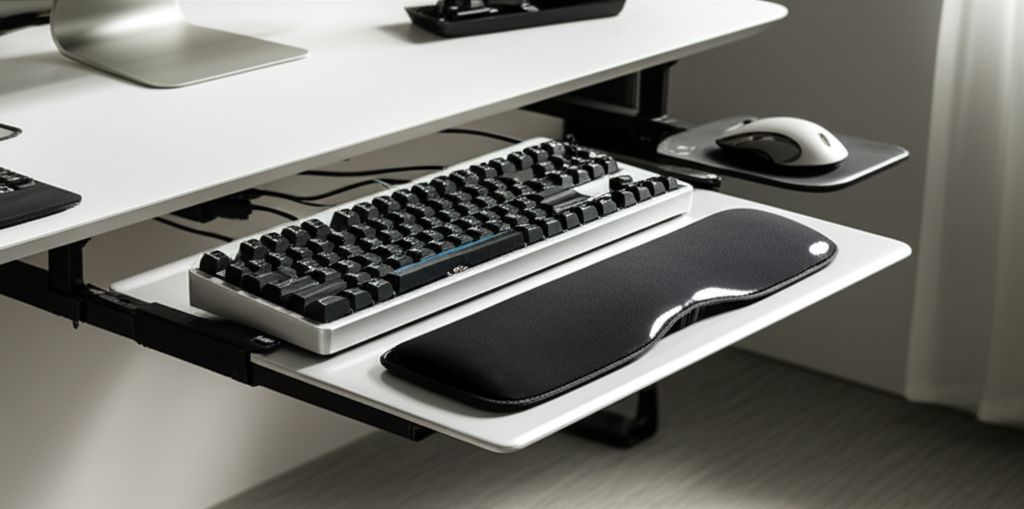
A good wrist rest can provide crucial support for your wrists while typing or mousing, especially if your keyboard tray doesn’t have built-in padding. They help keep your wrists in a neutral position, preventing them from bending upwards or downwards, which can cause discomfort and injury over time. These are simple yet incredibly effective additions to any under desk setup.
Types of Wrist Rests
Wrist rests come in various materials, including memory foam, gel, and fabric. Memory foam offers plush cushioning and conforms to your wrists, while gel provides a cooler, firmer support. Fabric options are often more breathable and less prone to heat buildup. The choice often comes down to personal preference for feel and support.
Placement and Usage Tips
Ensure your wrist rest is positioned correctly – it should support the heel of your palm, not your wrist itself, allowing your fingers to move freely over the keys. Avoid resting your wrists on the rest while actively typing; it’s meant for breaks between typing bursts. Proper usage prevents you from inadvertently bending your wrists.
3. Mouse Pads with Wrist Support
Similar to wrist rests, mouse pads with integrated wrist support offer a combined solution for your mousing hand. They provide a smooth surface for your mouse while offering cushioning for your wrist, ensuring comfortable and supported movement. This is particularly useful if your keyboard tray has a dedicated mouse area or if you simply want an extra layer of comfort for your dominant hand.
Enhancing Mouse Comfort
A mouse pad with wrist support ensures your wrist stays elevated and aligned with your mouse. This prevents the downward pressure that can occur when your wrist rests directly on a hard surface. It promotes a gliding motion rather than a dragging one, reducing friction and strain.
Material and Design Considerations
Look for mouse pads made from durable, non-slip materials that offer a smooth tracking surface for your mouse. The wrist support portion should be firm enough to provide support but soft enough to be comfortable. Many also come with attractive designs to add a touch of personality to your workspace.
4. Cable Management Solutions
The clutter of cables can detract from the aesthetic and functionality of your workspace, especially under your desk. Investing in cable management solutions like ties, sleeves, or under-desk trays can keep everything tidy and out of the way. This not only looks better but also prevents cables from snagging or getting damaged.
Benefits of a Tidy Workspace
A well-organized cable system contributes to a cleaner, more focused environment. It reduces visual distractions and makes it easier to clean your workspace. Furthermore, it protects your cables from wear and tear, extending their lifespan and preventing potential electrical hazards.
Popular Cable Management Tools
Cable Ties/Velcro Straps: Simple, effective for bundling multiple cables together.
Cable Sleeves: Enclose several cables within a flexible, often expandable sleeve for a neater appearance.
Under-Desk Cable Trays/Baskets: Mount directly beneath your desk to hold power strips, adapters, and excess cable length, keeping them off the floor.
Adhesive Cable Clips: Small clips that stick to the underside of your desk or tray to route individual cables neatly.
5. Footrests
While not directly attached to your keyboard tray, a footrest is a vital ergonomic accessory that complements its function. It helps you maintain proper posture by allowing you to keep your feet flat and supported, especially if your chair doesn’t allow for this naturally. This contributes to overall body alignment and reduces pressure on your lower back.
Achieving Full Body Alignment
A footrest ensures your feet are supported, preventing your legs from dangling or being angled awkwardly. This allows your hips to remain in a neutral position, which in turn supports a healthy spine alignment. It completes the ergonomic triangle of support: chair, desk, and footrest.
Types of Footrests
Footrests vary from simple angled platforms to adjustable models with massage rollers or rocking capabilities. Some are designed to encourage gentle movement, which can improve circulation and reduce stiffness. Consider adjustability and the ability to find a comfortable angle for your feet.
6. Monitor Arms and Mounts
Positioning your monitor at the correct eye level is crucial for preventing neck strain. A monitor arm that attaches to your desk or uses your keyboard tray’s mounting capabilities can significantly improve your setup. This allows for easy adjustment of height, tilt, and swivel, ensuring your screen is always optimally positioned.
The Importance of Monitor Placement
Looking down at your screen for extended periods puts immense strain on your neck and upper back. A monitor arm allows you to raise your screen to eye level, promoting a straight neck posture. This simple change can prevent headaches and reduce discomfort significantly. You can find monitor arms that attach directly to the edge of your desk or even some that integrate with compatible keyboard trays.
Types of Monitor Mounts
Desk Clamps: The most common type, attaching securely to the edge of your desk.
Grommet Mounts: For desks with pre-drilled holes, offering a sleek, integrated look.
Freestanding Mounts: Sit on your desk, useful if you can’t clamp or drill.
Keyboard Tray Integrated Mounts: Some advanced keyboard trays come with built-in monitor arm compatibility or even integrated monitor stands.
7. Task Lighting
Good lighting is often overlooked but is essential for reducing eye strain and improving focus. Under-desk lighting can provide ambient illumination or targeted light for your keyboard and workspace, creating a more comfortable and productive environment. This is especially helpful in rooms with inconsistent natural light.
Reducing Eye Strain and Enhancing Focus
Inadequate lighting forces your eyes to work harder, leading to fatigue, headaches, and reduced concentration. Proper task lighting illuminates your immediate workspace without causing glare on your screen. This makes it easier to see your keyboard and any documents you might be working with.
Under-Desk Lighting Options
LED Light Strips: Flexible and versatile, these can be discreetly attached to the underside of your desk or keyboard tray for ambient or focused lighting.
Clip-on Desk Lamps: Smaller lamps that can be clamped onto the edge of your desk or keyboard tray for directional lighting.
* Integrated Tray Lighting: Some premium keyboard trays feature built-in LED lighting, offering a clean, all-in-one solution.
8. Ergonomic Keyboard Tray Mats
While not a high-tech gadget, a soft mat for your keyboard tray can add a surprising amount of comfort. These mats provide a cushioned surface for your keyboard and mouse, reducing vibration and creating a softer feel. They can also help keep your keyboard and mouse from sliding around.
Comfort and Stability
A keyboard tray mat can absorb some of the impact from typing, making it feel softer and more comfortable. It also provides a slightly grippier surface, ensuring your keyboard and mouse stay put, even during intense work sessions. This subtle addition can make a noticeable difference in your daily comfort.
Material and Texture Choices
Look for mats made from materials like neoprene, rubber, or a soft cloth. Neoprene and rubber offer good grip and durability, while cloth can provide a softer feel. The texture can also influence how your mouse glides.
9. Desk Organizers and Drawer Inserts
Keeping your immediate workspace tidy is key to maintaining focus. Small organizers that fit within or attach to your keyboard tray, or drawer inserts that keep your supplies neat, can make a big difference. Think pen holders, small trays for clips, or even a compact phone stand.
Maintaining a Clutter-Free Zone
A decluttered desk promotes a decluttered mind. Having dedicated spots for your essentials means you spend less time searching and more time working. These small organizers can transform your under-desk area into a model of efficiency.
Creative Storage Solutions
Consider slim drawer organizers, small modular trays, or even magnetic strips that can attach to metal parts of your desk or tray. A vertical phone stand can also be a great addition, keeping your device visible and accessible without taking up valuable surface space.
Putting It All Together: Your Optimized Workspace
Transforming your under desk keyboard tray setup is about creating a harmonious ecosystem of comfort and efficiency. By carefully selecting these accessories, you’re not just buying products; you’re investing in your health, productivity, and overall well-being. It’s about making your workspace work for you, not the other way around.
Creating a Workflow with Your Tray Accessories
Imagine this: Your keyboard and mouse are perfectly positioned on your tray, supported by plush wrist rests. Your monitor is at eye level, thanks to a sleek monitor arm. Your cables are neatly managed, and a soft task light illuminates your work area. Your essential tools are within easy reach in organized compartments. This is the power of a well-accessorized under desk keyboard tray setup.
The Long-Term Benefits
The advantages extend beyond immediate comfort. By reducing physical strain and improving focus, you’ll likely find yourself more productive and less prone to burnout. A well-designed workspace can also boost your mood and creativity, making work feel less like a chore and more like an engaging activity. It’s a holistic approach to enhancing your work-from-home experience.
Frequently Asked Questions
Q1: Do I really need wrist rests with an under desk keyboard tray?
While some keyboard trays have built-in padding, dedicated wrist rests offer superior support and customizable comfort. They help maintain a neutral wrist posture, preventing strain during long typing sessions, which is a key benefit of using a tray.
Q2: How can I manage all the cables under my desk with a keyboard tray?
Cable management solutions like ties, sleeves, and under-desk trays are essential. Mount a cable tray beneath your desk to hold power strips and excess wiring, and use clips or sleeves to route individual cables neatly along the tray or desk legs.
Q3: What’s the best way to position my monitor with an under desk keyboard tray?
Use a monitor arm that attaches to your desk or tray to position your screen at eye level. This prevents neck strain and ensures proper ergonomic alignment, complementing the benefits of your keyboard tray.
Q4: Can a footrest really make a difference if I already have a keyboard tray?
Absolutely. A footrest ensures your entire body is properly aligned. It supports your feet, allowing for a more neutral hip and spine posture, which is crucial for overall ergonomic health, even with a good keyboard tray.
Q5: Are there any accessories that attach directly to the keyboard tray itself?
Yes, some advanced keyboard trays offer integrated features or mounting points for accessories like monitor arms, wrist rests, or even small organizers. Always check the specifications of your tray for compatibility.
Q6: What kind of lighting is best for an under desk setup?
Discreet LED light strips or clip-on lamps are ideal for under-desk lighting. They provide focused illumination without causing glare on your screen, reducing eye strain and improving visibility of your keyboard and workspace.
Conclusion: Your Path to a Superior Workspace
Investing in the best accessories for your under desk keyboard tray is a powerful step towards a more ergonomic, productive, and enjoyable work-from-home experience. From supportive wrist rests and optimal monitor placement to efficient cable management and task lighting, each addition plays a vital role in creating a workspace that truly supports your well-being. By thoughtfully curating these elements, you transform your desk from a simple workstation into a personalized command center for success. Embrace these enhancements and feel the difference in your comfort, focus, and overall productivity.
