


Published on: September 4, 2025 | Updated on: September 4, 2025
Optimize your home office for peak comfort and productivity with this essential guide on keyboard drawer placement for ergonomic typing. Discover how the right height and depth can prevent strain and boost your workflow.
Welcome to your ultimate guide to creating a home office that truly works for you! We all know the frustration of a workspace that feels just a little bit… off. Maybe your shoulders ache, your wrists feel tired, or you simply can’t seem to find a comfortable position. Often, a key culprit is overlooked: the humble keyboard drawer. Getting its placement just right is a game-changer for ergonomic typing and overall well-being.
This guide is designed to demystify keyboard drawer placement, offering simple, actionable steps to transform your desk setup. We’ll explore why this detail matters so much, how to find the perfect height and depth for your unique body, and the benefits you can expect. Get ready to say goodbye to discomfort and hello to a more productive, pain-free workday!
Why Keyboard Drawer Placement Matters for Ergonomic Typing
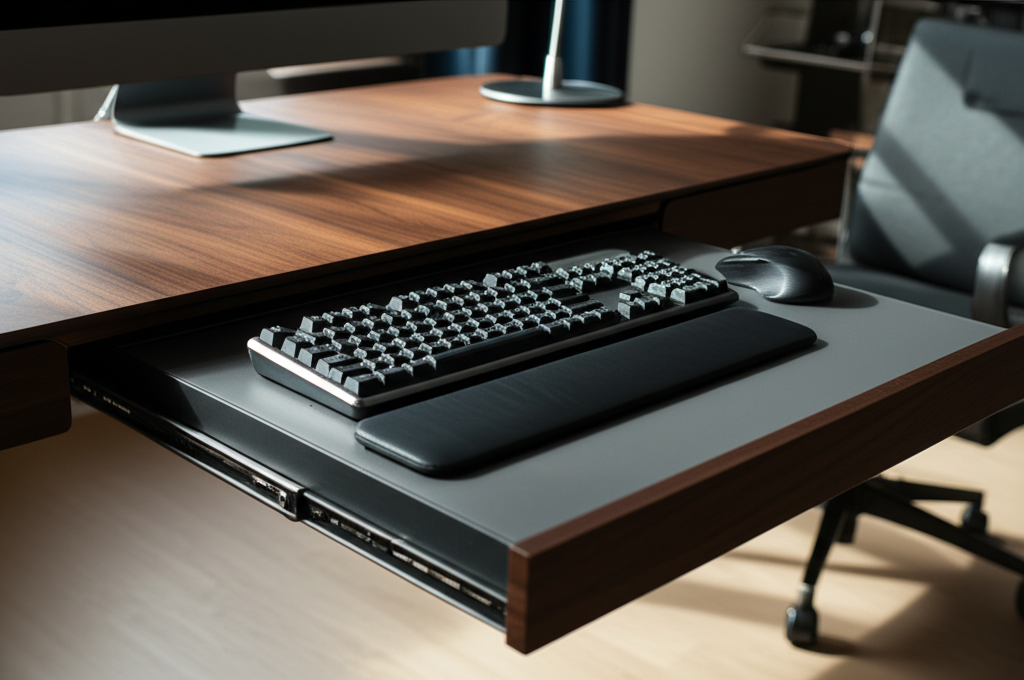
Getting your keyboard drawer placement right is crucial for preventing musculoskeletal issues and enhancing your typing experience. It’s not just about aesthetics; it’s about your health and efficiency.
A poorly positioned keyboard drawer can lead to a cascade of physical complaints. Think wrist pain, neck strain, and even back discomfort. This happens because your body is forced into unnatural and sustained postures.
When your keyboard is too high, you might find yourself hunching your shoulders or extending your wrists upwards. Conversely, if it’s too low, you might be craning your neck downwards or bending your wrists awkwardly. These subtle misalignments, over time, can cause significant discomfort and long-term problems.
The Science Behind the Perfect Position
Ergonomics is the science of designing and arranging things so that people can use them easily and safely. When it comes to keyboard drawer placement for ergonomic typing, this means aligning your body’s natural angles. Your goal is to achieve a neutral wrist position, where your wrists are straight, not bent up, down, or sideways.
This neutral posture minimizes stress on the nerves and tendons in your wrists and forearms. It allows for smoother, more efficient typing and reduces the risk of repetitive strain injuries like carpal tunnel syndrome. The keyboard should be at a height that allows your forearms to be parallel to the floor, with your elbows bent at approximately a 90-degree angle.
Common Pitfalls to Avoid
Many home office setups fall into common traps regarding keyboard drawers. One frequent mistake is assuming a one-size-fits-all approach. What works for one person might be disastrous for another, depending on their height, chair, and desk.
Another pitfall is placing the keyboard drawer solely based on its aesthetic integration with the desk. While looks are important, functionality and your physical well-being must take precedence. We’ll explore how to balance these considerations effectively.
Understanding Your Body: The Foundation of Ergonomic Placement
Before you even think about adjusting a drawer, understanding your own body is paramount. Your unique physical dimensions are the most critical factor in determining the ideal keyboard drawer placement for ergonomic typing.
Your height, arm length, and even the way you naturally sit at your desk all play a role. There’s no magic number that fits everyone, so personalization is key. This is where we move from general principles to specific measurements for your setup.
Key Body Measurements for Reference
To achieve proper keyboard drawer placement, consider these key body measurements:
Elbow Height (seated): With your feet flat on the floor and your back supported, measure from the floor to the underside of your elbow. This measurement is a good starting point for determining your ideal keyboard height.
Forearm Length: Measure from your elbow to your wrist. This helps gauge how much space you need between the keyboard and your seated position.
Shoulder Width: While less critical for drawer placement, it influences overall comfort and arm posture.
These measurements help translate ergonomic principles into tangible adjustments for your workspace. They ensure that your setup actively supports, rather than hinders, your physical comfort.
The Role of Your Chair and Desk Height
Your ergonomic chair and desk height are inextricably linked to optimal keyboard drawer placement. They form the fundamental structure of your workstation.
An adjustable ergonomic chair is your best friend here. It allows you to position your feet flat on the floor and your thighs parallel to the ground, creating the correct base for all other adjustments. If your chair isn’t adjustable, you might need to use a footrest to achieve the proper seated posture.
The height of your desk, or the surface your keyboard drawer attaches to, sets the upper limit for your keyboard’s position. If your desk is fixed, the keyboard drawer becomes the primary adjustment point. If both are adjustable, you have more flexibility to find that perfect ergonomic sweet spot.
Finding the Ideal Keyboard Drawer Height
The height of your keyboard drawer is arguably the most critical factor for ergonomic typing. It directly impacts your wrist and arm posture, so getting it right is essential.
The golden rule is to ensure your wrists remain straight and neutral while typing. This means your forearms should be roughly parallel to the floor, and your elbows should be bent at about a 90-degree angle.
The 90-Degree Elbow Rule Explained
The 90-degree elbow rule is a cornerstone of ergonomic advice. It suggests that your elbows should be bent at approximately 90 degrees when your hands are on the keyboard. This posture minimizes strain on your shoulder, elbow, and wrist joints.
If your keyboard is too high, you’ll likely find yourself raising your shoulders or bending your wrists upwards. If it’s too low, you might bend your wrists downwards or lean forward, straining your neck and upper back. Achieving that 90-degree bend is key to comfort.
Calculating Your Ideal Keyboard Height
To calculate your ideal keyboard height, start with your seated elbow height measurement. Subtract approximately 1-2 inches from this measurement. This accounts for the thickness of the keyboard itself and ensures your forearms are parallel to the floor.
For example, if your seated elbow height is 28 inches, your target keyboard surface height might be around 26-27 inches. Remember, this is a starting point. You’ll need to fine-tune it based on your specific keyboard and personal comfort.
Adjusting for Different Keyboard Depths and Ergonomic Keyboards
The depth of your keyboard and whether you use an ergonomic split keyboard can also influence placement. Deeper keyboards might require a slightly lower drawer to maintain that neutral wrist position.
Ergonomic keyboards, especially split designs, often have a different profile. They might be thicker or require a wider stance for your hands. Ensure your keyboard drawer can accommodate the width and provides enough clearance for your hands and wrists to rest comfortably without hitting the edges.
The Importance of Keyboard Drawer Depth and Clearance
While height is king, the depth of your keyboard drawer and the clearance it provides are also vital for comfortable, ergonomic typing. These factors influence how close you can position yourself to your desk and how your arms and wrists are supported.
The depth determines how far the keyboard can extend towards you. Adequate clearance prevents your knees or thighs from bumping against the underside of the drawer, allowing you to sit closer to your desk. This closer proximity can improve posture and reduce the need to overreach.
Achieving Optimal Arm and Wrist Support
A well-placed keyboard drawer should allow your arms to rest naturally at your sides, with your elbows bent comfortably. The drawer’s depth should facilitate this by letting you pull the keyboard close enough to your body.
Ideally, your wrists should be able to rest on a soft wrist rest or the desk surface without bending. The drawer’s design should facilitate this, preventing any awkward angles or pressure points. A drawer that is too shallow might force you to extend your arms awkwardly, leading to strain.
Clearance for Your Knees and Thighs
This is a practical consideration that significantly impacts comfort. You need enough clearance under the desk and within the drawer cavity to avoid bumping your knees or thighs. This allows you to sit closer to your desk, bringing the keyboard and monitor into a more ergonomic alignment.
If your keyboard drawer is too deep or has a bulky support mechanism, it can impede your seating position. Measure the usable space within the drawer and beneath it to ensure it doesn’t restrict your leg movement. This is especially important if you’re shorter or prefer to sit very close to your desk.
Types of Keyboard Drawers and Their Placement Considerations
Not all keyboard drawers are created equal. The type you choose will have specific implications for how you install and position it for optimal ergonomic typing.
From simple under-desk trays to fully integrated solutions, each has its own set of pros and cons regarding adjustability and ease of placement. Understanding these differences helps you make the best choice for your workspace.
Under-Desk Keyboard Trays
These are perhaps the most common type, offering a dedicated platform that attaches beneath your existing desk surface. Many are adjustable in height and angle, providing excellent flexibility for ergonomic setup.
When installing an under-desk tray, pay close attention to the manufacturer’s recommended height range. Use your body measurements and the 90-degree elbow rule to determine the ideal mounting height. Ensure there’s enough clearance underneath for your legs.
Built-in Desk Drawers
Some desks come with integrated keyboard drawers. While these offer a sleek, minimalist look, they often lack adjustability. This can make achieving perfect keyboard drawer placement for ergonomic typing more challenging.
If your desk has a built-in drawer, you might need to adapt your seating or use accessories like a keyboard cushion or footrest. Measure the drawer’s internal height and depth carefully to see if it naturally aligns with ergonomic principles. Sometimes, you might need to add a riser to elevate the keyboard if the drawer is too low.
Keyboard Drawer Slides (DIY Installation)
For those with a DIY spirit or a desk that needs a custom solution, installing keyboard drawer slides yourself is an option. This gives you maximum control over the placement and depth.
When installing slides, carefully measure the desired height and depth. Mark pilot holes accurately to ensure the drawer sits level and at the perfect ergonomic position. Consider the travel distance of the slides to ensure the keyboard can be pulled out sufficiently for comfortable typing.
Installing Your Keyboard Drawer for Perfect Ergonomics
Installation is where the theory meets practice. Taking your time and following a methodical approach will ensure your keyboard drawer is perfectly positioned for ergonomic typing.
Measure twice, cut once is the mantra here. Precision during installation prevents the need for frustrating readjustments later.
Step-by-Step Installation Guide
1. Determine the Ideal Height: Sit at your desk with your ergonomic chair adjusted correctly. Place your hands on your desk where your keyboard would naturally sit. Measure the distance from the desk surface to the underside of your elbows. Subtract 1-2 inches from this measurement to get your target keyboard surface height.
2. Mark the Mounting Position: Hold the keyboard drawer or its mounting bracket against the underside of your desk at your target height. Ensure it’s centered and there’s adequate clearance for your knees. Use a pencil to lightly mark the screw hole locations.
3. Pre-Drill Pilot Holes: Using a drill bit slightly smaller than your screws, carefully pre-drill pilot holes at your marked locations. This prevents the wood from splitting and makes screw insertion easier.
4. Attach the Drawer/Slides: Securely attach the keyboard drawer or slides to the underside of the desk using the provided screws. Ensure everything is level and moves smoothly.
5. Test and Adjust: Place your keyboard in the drawer. Sit down and test the position. Type for a few minutes. Are your wrists straight? Are your elbows at roughly 90 degrees? Make minor adjustments if necessary by slightly repositioning the drawer or adding risers/cushions.
Tools You Might Need
Measuring tape
Pencil
Drill with appropriate drill bits
Screwdriver (or drill attachment)
Level
* Safety glasses
Having these tools ready will make the installation process smoother and more efficient. Always prioritize safety during any DIY project.
Optimizing Your Setup: Beyond Just the Keyboard Drawer
While perfect keyboard drawer placement is a significant step, a truly ergonomic workspace involves more. Consider how your keyboard drawer integrates with other elements of your setup.
Your monitor, mouse, and even your lighting play crucial roles in your overall comfort and productivity. Think holistically about your workspace design.
Monitor Placement: The Next Crucial Step
Your monitor should be positioned directly in front of you, at arm’s length. The top of the screen should be at or slightly below eye level. This prevents neck strain from looking up or down.
If your keyboard drawer allows you to sit closer to the desk, you can achieve better monitor alignment. Ensure your keyboard placement doesn’t force you to sit too far back, compromising your monitor’s position.
Mouse Placement for Reduced Strain
Your mouse should be placed at the same level as your keyboard, close enough so you don’t have to reach. This keeps your arm and wrist in a neutral position. If your keyboard drawer is deep enough, you might place your mouse directly on it.
Alternatively, consider a separate mouse tray that attaches to the side of your desk or keyboard drawer. This ensures your mouse is always within easy reach without compromising your keyboard posture.
Lighting and Other Accessories
Good lighting is essential to prevent eye strain. Position your desk so natural light comes from the side, not directly in front or behind your monitor. Use a desk lamp for task lighting, avoiding glare on your screen.
Other accessories like wrist rests can provide additional comfort. Ensure any wrist rest you use supports your palms, not your wrists directly, and doesn’t push your hands into an awkward angle.
Benefits of Proper Keyboard Drawer Placement
The effort invested in achieving the correct keyboard drawer placement for ergonomic typing yields significant rewards. These benefits extend beyond mere comfort to impact your overall health and work performance.
You’ll likely notice a reduction in aches and pains, leading to a more enjoyable workday. But the advantages go even further.
Reduced Risk of Repetitive Strain Injuries (RSIs)
By promoting neutral wrist and arm postures, correct placement significantly lowers your risk of developing RSIs like carpal tunnel syndrome, tendonitis, and epicondylitis (tennis elbow). These conditions can be debilitating and costly to treat.
Investing in proper ergonomic setup is a proactive measure for long-term health. It’s about preventing pain before it starts, allowing you to work comfortably for years to come.
Increased Comfort and Productivity
When you’re not constantly shifting to find a comfortable position or dealing with discomfort, your focus improves dramatically. Reduced physical strain translates directly into enhanced concentration and sustained productivity throughout the day.
You’ll find yourself less fatigued, more engaged, and able to complete tasks more efficiently. This ergonomic advantage can be a real game-changer for remote workers and anyone spending long hours at their desk.
Improved Posture and Reduced Fatigue
Correct keyboard drawer placement encourages better overall body posture. When your arms and wrists are aligned, your shoulders tend to relax, and your upper back is less likely to round.
This improved posture not only feels better but also reduces overall physical fatigue. You’ll likely find you have more energy at the end of the workday, with less of that familiar desk-induced exhaustion.
Troubleshooting Common Keyboard Drawer Placement Issues
Even with careful planning, you might encounter minor issues. Don’t get discouraged; most common problems have straightforward solutions.
The key is to identify the specific discomfort and trace it back to its likely cause in your setup. Then, implement the appropriate adjustment.
My Wrists Still Feel Bent
If your wrists still feel bent upwards or downwards despite the drawer’s position, double-check your chair height and desk height. Ensure your feet are flat on the floor or a footrest. You might need to lower the keyboard drawer slightly or consider a lower-profile keyboard.
Sometimes, the thickness of the keyboard itself is the issue. If your keyboard is particularly thick, it might require a drawer that sits a bit lower than your initial calculation.
I Can’t Sit Close Enough to My Desk
This often indicates insufficient knee clearance under the desk or within the drawer cavity. If the drawer itself is the problem, you might need to modify it, install shallower slides, or reconsider its placement.
If the desk structure is the issue, ensure you’re not sitting too far back. Try adjusting your chair to bring yourself closer, and if your knees still hit, you may need to explore desk modifications or a different desk entirely.
My Arms Feel Strained or Too Close
If your arms feel cramped or you have to force your elbows in, your keyboard drawer might be positioned too close or is too shallow. Try extending the drawer further out or ensure there’s enough space for your elbows to rest naturally at your sides.
Conversely, if your arms feel like they are reaching too far, the drawer might be too far back. Ensure the slides allow for adequate extension.
Frequently Asked Questions (FAQ)
Q1: What is the ideal height for a keyboard drawer for ergonomic typing?
A: The ideal height allows your forearms to be parallel to the floor and your elbows bent at approximately 90 degrees. Measure your seated elbow height and subtract 1-2 inches for the keyboard surface.
Q2: Can I use a keyboard drawer if I have a standing desk?
A: Yes, many standing desks have integrated keyboard trays or are compatible with under-desk keyboard drawers. The principle remains the same: position it at elbow height for comfortable typing while seated.
Q3: Does the type of keyboard affect drawer placement?
A: Yes, thicker keyboards or ergonomic split keyboards might require slight adjustments to the standard placement to maintain neutral wrist posture. Ensure adequate clearance.
Q4: What if my desk doesn’t have a keyboard drawer?
A: You can easily add one using an under-desk keyboard tray or by installing keyboard drawer slides yourself. This allows you to customize the placement precisely.
Q5: How far should my keyboard drawer extend?
A: It should extend far enough to allow your elbows to remain at about 90 degrees with your arms comfortably at your sides, bringing the keyboard close to your body.
Q6: Is a wrist rest necessary with a keyboard drawer?
A: Wrist rests can add comfort, but they are not always necessary if your keyboard drawer placement already achieves neutral wrist posture. If used, ensure it supports the palm base, not the wrist itself.
Conclusion: Elevate Your Workspace, Elevate Your Well-being
Achieving optimal keyboard drawer placement for ergonomic typing is a foundational step towards a more comfortable, productive, and healthy home office. By understanding your body, carefully measuring, and making precise adjustments, you can transform your workspace from a source of strain into a haven of efficiency.
Remember, the goal is to create a setup that feels natural and supportive, allowing you to focus on your work without physical distraction. Don’t underestimate the power of these seemingly small details. A well-placed keyboard drawer is an investment in your long-term well-being and a significant boost to your daily productivity.
Take the time to implement these guidelines, and you’ll undoubtedly feel the difference. Your body will thank you, and your work quality will likely soar. Happy typing!
