


Published on: September 1, 2025 | Updated on: September 1, 2025
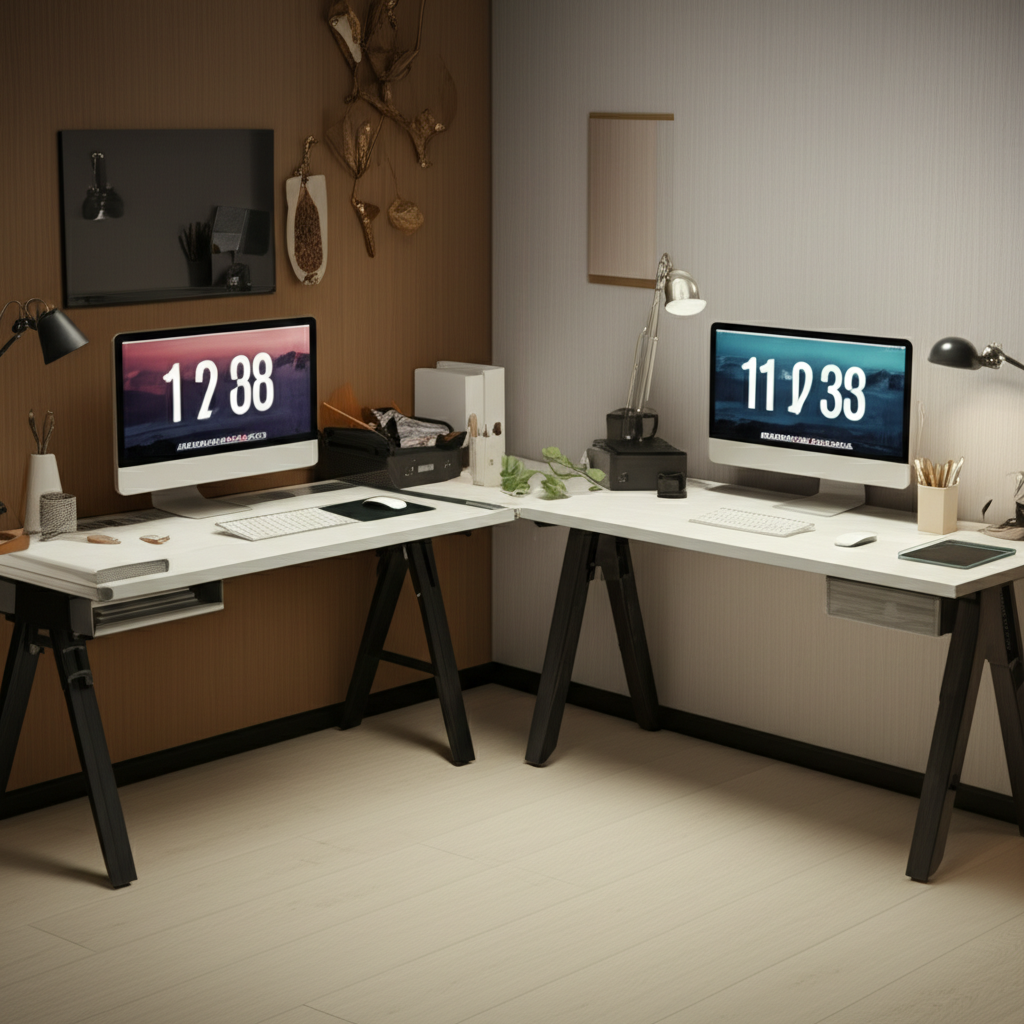
Unlock peak productivity and comfort with a genius two-desk home office setup. Discover essential elements, smart organization, and ergonomic principles to transform your workspace into a haven of efficiency and well-being.
So, you’re thinking about a two-desk home office setup? It sounds a bit unusual, doesn’t it? Perhaps you’re wondering if it’s just a trend or if it can genuinely boost your productivity and comfort. Many remote workers grapple with creating a home workspace that feels both functional and inspiring. You might be struggling with limited space, or perhaps you’re looking for ways to compartmentalize your work and personal activities. This guide is designed to demystify the concept of a two-desk home office, offering practical, actionable advice to help you craft an optimized and stylish environment. We’ll explore why this setup works, how to implement it effectively, and the key elements that make it a genius move for your productivity and well-being.
Why a Two-Desk Home Office Setup is Genius

A two-desk home office setup isn’t just about having more surface area; it’s a strategic approach to workspace design that can dramatically enhance focus and efficiency. By dedicating distinct zones for different tasks, you create a mental separation that reduces distractions and promotes deeper work. This setup caters to the evolving needs of modern professionals who often juggle multiple projects or require specialized environments for creative thinking versus administrative tasks. It’s a smart solution for anyone looking to maximize their home workspace potential.
The Power of Zoning: Separate Work, Separate Mind
The core genius of a two-desk home office lies in its ability to create distinct zones for different types of work. One desk might be your primary computer station, optimized for deep focus and digital tasks. The other could serve as a creative hub, a space for brainstorming, sketching, or handling physical paperwork. This separation helps your brain switch gears more easily, reducing cognitive load and improving task performance.
Boosting Productivity Through Dedicated Spaces
When your environment aligns with the task at hand, your productivity naturally increases. A dedicated space for focused work minimizes the temptation to multitask or get sidetracked. Similarly, having a separate area for less intensive tasks, like reviewing documents or making calls, prevents your primary workspace from becoming cluttered or overwhelming. This deliberate arrangement fosters a more efficient workflow.
Enhancing Ergonomics and Comfort
A well-designed two-desk setup can significantly improve your physical comfort and long-term health. You can position each desk to optimize ergonomics for specific activities. For instance, one desk could be set at a standing height for periods of active work, while the other is at a seated height for tasks requiring sustained concentration. This flexibility helps prevent the physical strain associated with prolonged sitting.
Adapting to Diverse Workflows
Whether you’re a graphic designer needing space for a tablet and drawing pad, a writer juggling research and drafting, or an entrepreneur managing different business facets, a two-desk setup offers unparalleled adaptability. It allows you to tailor your workspace to the specific demands of your profession and workflow, rather than trying to fit everything into a single, compromised area.
Designing Your Two-Desk Home Office: Key Considerations
Before you start rearranging furniture, it’s crucial to plan your two-desk home office setup thoughtfully. Consider the available space, your specific work needs, and how you want the overall environment to feel. Careful planning ensures that your setup is not only functional but also aesthetically pleasing and supportive of your productivity goals.
Assessing Your Space and Layout
Measure your available space carefully and sketch out potential layouts. Think about natural light sources, power outlet locations, and the overall flow of the room. Consider the size and shape of the desks you choose, ensuring they fit comfortably without making the space feel cramped or cluttered. A well-thought-out layout is the foundation of a successful home office.
Choosing the Right Desks: Function Meets Form
The type of desks you select will heavily influence the functionality and aesthetics of your two-desk setup. You might opt for two identical desks for a symmetrical look or choose complementary styles that serve different purposes. Consider adjustable-height desks for ergonomic flexibility, or perhaps a large L-shaped desk that can be configured into two distinct zones.
Prioritizing Ergonomics: Your Body Will Thank You
Ergonomics is paramount in any home office, and even more so with a two-desk setup. Ensure each desk is at an appropriate height for its intended use. Invest in an ergonomic chair that provides excellent lumbar support and adjustability. Position your monitors at eye level to prevent neck strain, and ensure your keyboard and mouse are at an angle that promotes neutral wrist posture.
Lighting: The Unsung Hero of Productivity
Proper lighting is essential for reducing eye strain and maintaining energy levels throughout the day. Aim for a layered lighting approach: ambient light for general illumination, task lighting for focused work at each desk, and accent lighting to create a pleasant atmosphere. Natural light is always best, so position your desks to take advantage of windows if possible.
Storage Solutions: Keeping Clutter at Bay
With two desks, the potential for clutter can double. Smart storage is non-negotiable. Utilize wall shelves, filing cabinets, desk organizers, and drawer units to keep supplies, documents, and equipment neatly stored and easily accessible. A well-organized space promotes a clear mind and enhances efficiency.
The Two-Desk Home Office Setup: Practical Implementation
Translating your design ideas into a functional two-desk home office requires careful placement and thoughtful organization. It’s about creating a cohesive yet distinct workspace that supports your unique workflow and enhances your overall productivity. Let’s delve into the practical steps to bring your genius setup to life.
Layout Options for Your Two Desks
There are several effective ways to arrange two desks within a home office. The most popular include placing them back-to-back for shared space or individual focus, positioning them in an L-shape to create a larger work surface and distinct zones, or setting them up parallel to each other to facilitate collaboration or simply provide ample working room. Consider the size of your room and how you move within it when deciding on the best layout.
Back-to-Back: Ideal for maximizing a rectangular space or creating distinct visual separation.
L-Shape: Offers a continuous work surface and defines zones efficiently, great for corner spaces.
Parallel: Provides ample working area and can encourage a sense of shared focus if positioned opposite each other.
Desk Placement Strategies for Optimal Workflow
Think about how you naturally transition between tasks. If you often move from computer work to creative brainstorming, placing your creative desk adjacent to your computer desk might be beneficial. If you need to keep client-facing activities separate from deep work, positioning desks in opposite corners of the room could be ideal. The goal is to create a workflow that feels intuitive and minimizes unnecessary movement.
Cable Management: The Secret to a Clean Look
Visible cables can quickly make even the most stylish office look messy. Invest in cable management solutions like cable clips, sleeves, raceways, or a cable management box. This will not only improve the aesthetics but also prevent tripping hazards and make cleaning easier. A tidy desk environment contributes significantly to a focused mindset.
Integrating Technology Seamlessly
Ensure your setup accommodates your technological needs. This includes having enough power outlets, convenient access to USB ports, and ergonomic placement for monitors, laptops, and other devices. Consider a dual-monitor setup for increased screen real estate, which can be particularly beneficial in a two-desk arrangement.
Personalizing Your Workspace for Inspiration
While functionality is key, don’t forget to infuse your personality into the space. Add plants for a touch of nature, inspirational artwork, or personal photos to create an environment that motivates you. The right décor can transform your home office from a mere workspace into a sanctuary that sparks creativity and well-being.
Ergonomic Essentials for Your Two-Desk Setup
Creating a comfortable and healthy workspace is crucial, especially when you spend significant hours working from home. With a two-desk setup, you have a unique opportunity to optimize your ergonomic experience for different tasks and postures. Investing in the right ergonomic tools will pay dividends in comfort, productivity, and long-term health.
The Cornerstone: An Ergonomic Chair
Your chair is arguably the most important piece of furniture in your home office. Look for a chair with adjustable height, lumbar support, armrests, and a breathable mesh back. The ability to customize your chair ensures proper posture and reduces strain, allowing you to work comfortably for extended periods.
Adjustable Lumbar Support: Crucial for maintaining the natural curve of your spine.
Seat Height Adjustment: Allows you to keep your feet flat on the floor with thighs parallel to the ground.
Adjustable Armrests: Support your arms and shoulders, reducing tension in your neck and upper back.
Standing Desk Integration: The Best of Both Worlds
Incorporating a standing desk into your two-desk setup offers incredible benefits. Alternating between sitting and standing throughout the day can improve circulation, reduce back pain, and boost energy levels. You could have one fixed-height desk and one adjustable-height desk, or even two sit-stand desks that you can customize.
Monitor Placement: Eye Level is Key
Proper monitor placement is vital for preventing neck and eye strain. Your monitors should be positioned at arm’s length away, with the top of the screen at or slightly below eye level. Use monitor stands or adjustable monitor arms to achieve the ideal height and angle, especially if you have multiple screens.
Keyboard and Mouse Ergonomics
The placement of your keyboard and mouse should allow your elbows to be bent at roughly a 90-degree angle, with your wrists in a neutral position. Consider an ergonomic keyboard or mouse if you experience wrist discomfort. Ensure they are easily accessible at both desks if you plan to use them interchangeably.
Footrests and Other Supportive Accessories
A footrest can be beneficial if your feet don’t comfortably reach the floor when sitting, helping to maintain proper posture. Other accessories like wrist rests for keyboards and mice can also enhance comfort. These small additions can make a big difference in your overall ergonomic experience.
Maximizing Productivity with a Two-Desk Setup
A two-desk home office setup is a powerful tool for boosting productivity, but only if you leverage its potential strategically. It’s about creating distinct environments that cater to different types of tasks and minimizing distractions. By implementing smart strategies, you can transform your workspace into an engine for efficiency.
Task Batching and Zone Utilization
Assign specific tasks or types of work to each desk. For example, Desk A could be your “deep work” zone, free from distractions, for writing or coding. Desk B could be your “communication” zone, for taking calls or responding to emails, perhaps with a more relaxed setup. This compartmentalization helps you focus.
Minimizing Distractions with Dedicated Zones
When you’re at your primary focus desk, minimize all potential distractions. This might mean keeping your phone on silent or in another room, closing unnecessary browser tabs, and letting household members know you need uninterrupted time. Your secondary desk can be for tasks that require less intense concentration.
Time Management Techniques for Dual Workspaces
Techniques like the Pomodoro Technique can be highly effective. Work in focused bursts (e.g., 25 minutes) at your primary desk, followed by short breaks. You can use the breaks to move to your secondary desk for a quick email check or to stretch. This structured approach helps maintain energy and focus.
The Role of Organization in Productivity
A tidy workspace directly correlates with a clear mind. Regularly declutter both desks and ensure everything has its place. A well-organized two-desk setup reduces the time spent searching for items, allowing you to dedicate more energy to your actual work.
Incorporating Movement and Breaks
A two-desk setup, especially with a standing desk option, encourages movement. Use your breaks to switch between desks, stand up, stretch, or even walk around your home. Regular movement is crucial for physical health and can help prevent mental fatigue, ultimately boosting your overall productivity.
Smart Storage and Organization for Your Dual Workstations
The success of a two-desk home office hinges on effective organization. Without proper storage, your dual workstations can quickly become overwhelmed with clutter, defeating the purpose of increased space and functionality. Let’s explore smart strategies to keep your setup tidy and efficient.
Vertical Storage: The Space-Saving Solution
Utilize wall space with floating shelves, wall-mounted organizers, or tall bookshelves. This keeps your desk surfaces clear and maximizes storage capacity, especially in smaller rooms. Vertical storage is perfect for books, binders, and decorative items that add personality without taking up valuable workspace.
Drawer Units and Filing Cabinets
Invest in rolling drawer units or a compact filing cabinet to keep documents, stationery, and less frequently used items organized and out of sight. These mobile solutions can be tucked under a desk or positioned nearby, offering easy access when needed. They are essential for maintaining a clutter-free environment.
Desk Organizers and Accessories
Desk organizers, such as pen holders, letter trays, and compartmentalized caddies, are invaluable for keeping immediate workspace essentials tidy. Consider monitor risers with built-in storage or cable management systems to further declutter your desk surface. Small accessories can make a big difference in maintaining order.
Digital Organization: Beyond Physical Clutter
Just as important as physical organization is digital organization. Maintain clean desktop environments on your computers, organize files logically, and utilize cloud storage effectively. A streamlined digital workflow complements your physical workspace, enhancing overall efficiency.
Establishing a Routine for Tidiness
To maintain order, establish a daily or weekly tidying routine. Spend a few minutes at the end of each workday putting items back in their designated places. This habit prevents clutter from accumulating and ensures your workspace is always ready for the next productive session.
Enhancing Ambiance and Aesthetics in Your Two-Desk Office
Beyond functionality and ergonomics, the ambiance and aesthetics of your two-desk home office play a significant role in your well-being and motivation. Creating a visually pleasing and comfortable environment can transform your workspace into a place you genuinely enjoy spending time in. This is where personal style meets productivity.
Color Psychology and Your Workspace
Colors can evoke different moods and affect productivity. Blues and greens are often associated with calmness and focus, making them great choices for primary work areas. Warmer colors like yellow or orange can add a touch of energy and creativity, perhaps in a secondary workspace or through accent pieces.
Incorporating Plants for Biophilic Design
Adding plants to your home office can significantly improve air quality and reduce stress. Biophilic design, which connects us with nature, has been shown to boost creativity and productivity. Choose low-maintenance plants that thrive indoors and place them strategically around your desks.
Personal Touches and Décor Styles
Infuse your personality into the space with artwork, photographs, or decorative items that inspire you. Whether your style is minimalist, modern, bohemian, or industrial, ensure your décor complements the overall function of your workspace. A cohesive design makes the space more inviting.
Lighting for Mood and Task Performance
Layered lighting is key for both ambiance and task performance. Use ambient lighting for general illumination, task lighting (like desk lamps) for focused work at each desk, and perhaps accent lighting to highlight artwork or create a cozy atmosphere. Dimmable options allow for easy mood adjustments.
Soundproofing and Noise Reduction
If noise is a distraction in your home, consider soundproofing solutions like acoustic panels or thick rugs. Playing ambient music or white noise can also help mask distracting sounds and create a more focused environment. A peaceful workspace is essential for deep concentration.
Frequently Asked Questions About Two-Desk Home Offices
Here are some common questions people have when considering a two-desk home office setup.
Can a two-desk setup actually increase productivity?
Yes, a two-desk setup can significantly boost productivity by allowing you to create distinct zones for different tasks. This compartmentalization helps you focus better, reduces distractions, and streamlines your workflow by assigning specific activities to each desk.
What are the main benefits of having two desks at home?
The primary benefits include enhanced organization, improved task management through zoning, increased surface area for multitasking or creative work, better ergonomics by allowing for different desk heights or setups, and a clearer mental separation between different types of work.
How much space do I need for a two-desk home office?
The space requirement varies depending on the size of the desks and the desired layout. Generally, you’ll need enough room to comfortably place two desks and move around them, with adequate space for chairs and any additional storage. A rough guideline is at least 100-150 square feet for a comfortable setup.
Is it better to have two identical desks or different types?
This depends on your personal preference and workflow. Two identical desks can create a symmetrical and clean aesthetic. However, having different types of desks (e.g., a standing desk and a traditional desk, or a larger desk for creative work and a smaller one for computer tasks) can offer more functional flexibility.
What are essential ergonomic considerations for a two-desk setup?
Key considerations include ensuring each desk is at an appropriate height for its intended use, investing in an adjustable and supportive ergonomic chair, positioning monitors at eye level, and ensuring comfortable keyboard and mouse placement. Alternating between sitting and standing can also be a great ergonomic strategy.
How can I manage cables effectively with two desks?
Cable management is crucial. Use cable clips, sleeves, raceways, or cable management boxes to keep cords organized and out of sight. This not only improves aesthetics but also prevents tripping hazards and makes cleaning easier.
Conclusion: Your Genius Two-Desk Home Office Awaits
Embarking on a two-desk home office setup is a strategic decision that can profoundly impact your productivity, comfort, and overall well-being. By thoughtfully considering your space, choosing the right furniture, prioritizing ergonomics, and implementing smart organizational strategies, you can create a highly functional and inspiring workspace. This setup moves beyond a mere desk and chair to a dynamic environment designed to support diverse tasks and promote a healthier, more efficient work routine. Your two-desk home office isn’t just a workspace; it’s an investment in your professional success and personal comfort. So, take these insights, adapt them to your unique needs, and build the genius home office you deserve.
