


Published on: September 4, 2025 | Updated on: September 4, 2025
Unlock ultimate comfort and productivity with an ergonomic desk setup featuring a keyboard drawer. This guide provides essential tips to transform your workspace, reduce strain, and boost efficiency, creating a healthier and more enjoyable work environment.
Your home office should be a sanctuary of productivity, not a source of discomfort. Many of us spend hours at our desks, often hunched over or in awkward positions that lead to pain and fatigue. An ergonomic desk setup with a keyboard drawer is a game-changer, offering a streamlined and comfortable way to work. This guide will walk you through creating the perfect setup, ensuring your workspace supports your well-being and enhances your performance. Get ready to transform your daily grind into a more pleasant and pain-free experience.
The Power of an Ergonomic Desk Setup with Keyboard Drawer

An ergonomic desk setup prioritizes your physical comfort and long-term health. When designed correctly, it can significantly reduce the risk of musculoskeletal issues like carpal tunnel syndrome and back pain. The inclusion of a keyboard drawer is a key component, allowing for optimal monitor height and keyboard placement. This setup creates a harmonious workspace that supports natural posture and minimizes strain, leading to increased focus and sustained productivity.
This setup is crucial for anyone spending extended periods at their desk, ensuring a healthier and more efficient work routine.
Why a Keyboard Drawer is Your Workspace’s Best Friend
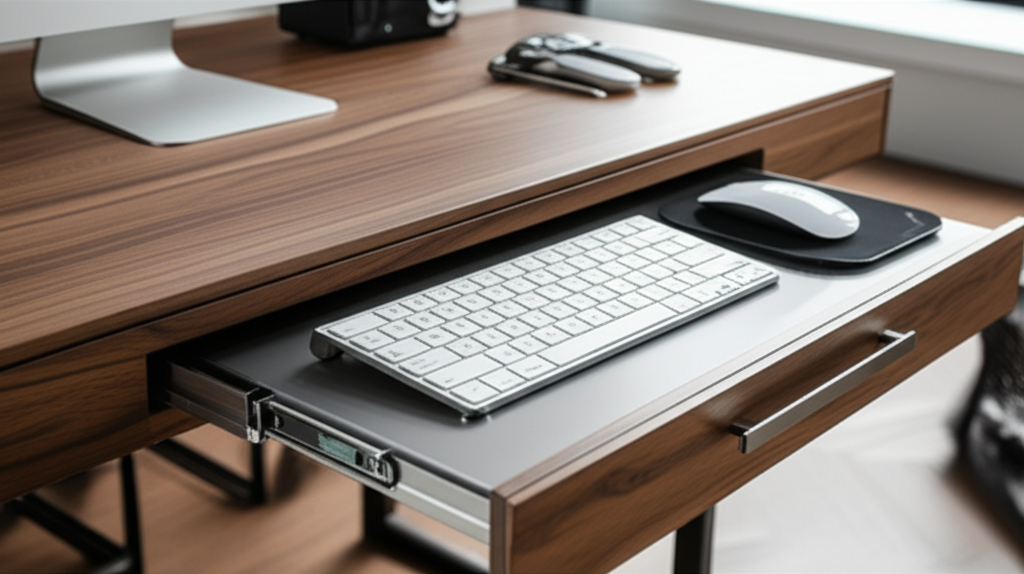
A dedicated keyboard drawer isn’t just a stylish addition; it’s a functional necessity for a truly ergonomic setup. It allows you to position your keyboard and mouse at the ideal height, typically at or slightly below elbow level, with your wrists straight and relaxed. This prevents the upward wrist strain common when keyboards sit directly on the desk. Furthermore, it frees up valuable desk surface area, contributing to a cleaner, more organized, and visually appealing workspace.
By elevating your keyboard and mouse, you create a more natural and comfortable typing position.
Enhancing Comfort and Reducing Strain
The primary benefit of a keyboard drawer is its ability to create an optimal ergonomic position for your hands, wrists, and arms. This alignment is vital in preventing repetitive strain injuries (RSIs) and the discomfort associated with prolonged computer use. When your keyboard is too high, you often have to bend your wrists upwards, putting undue pressure on the median nerve. A keyboard drawer corrects this, allowing for a neutral wrist posture, which is essential for comfort and preventing conditions like carpal tunnel syndrome.
Proper wrist alignment is key to long-term comfort and preventing pain.
Maximizing Desk Space and Organization
Beyond direct ergonomic benefits, a keyboard drawer is a masterclass in space optimization. It tucks away your keyboard and mouse when not in use, instantly decluttering your desk surface. This not only makes your workspace look tidier but also provides ample room for other essentials like your monitor, notepad, or a warm cup of coffee. A clear desk often leads to a clearer mind, fostering better focus and reducing distractions.
A tidy desk space can significantly improve your mental clarity and workflow.
Key Components of Your Ergonomic Desk Setup with Keyboard Drawer
Building an ergonomic workspace involves more than just adding a keyboard drawer. It’s about creating a holistic environment that supports your body and mind. This includes selecting the right desk, chair, monitor positioning, and ensuring proper lighting. Each element plays a crucial role in achieving optimal comfort and productivity.
Consider each component as part of a larger system designed for your well-being.
The Foundation: Choosing the Right Desk
Your desk is the central piece of your ergonomic setup. For an ergonomic desk setup with keyboard drawer, consider desks that are either height-adjustable or at a fixed height suitable for your seated position. If opting for a fixed desk, ensure it’s tall enough that when you add a keyboard drawer, the typing surface is at the correct height. Standing desks offer fantastic flexibility, allowing you to alternate between sitting and standing throughout the day, which is highly beneficial for circulation and reducing sedentary behavior.
A height-adjustable desk offers the most versatility for an ergonomic setup.
The Essential Partner: Selecting an Ergonomic Chair
No ergonomic setup is complete without a supportive chair. Look for a chair that offers adjustable height, lumbar support, armrests, and a comfortable seat depth. Your feet should rest flat on the floor, and your knees should be at roughly a 90-degree angle. The armrests should be at a height that allows your shoulders to remain relaxed while typing. A good chair is an investment in your health and will complement your keyboard drawer setup perfectly.
A well-adjusted ergonomic chair is crucial for maintaining good posture.
Monitor Placement: The Eye-Level Rule
The height and distance of your monitor are critical for preventing neck and eye strain. Ideally, the top of your monitor screen should be at or slightly below eye level. You should be able to look at the screen without tilting your head up or down excessively. The monitor should also be positioned at an arm’s length away from you. If you have multiple monitors, arrange them so the primary one is directly in front of you, with secondary monitors slightly angled.
Proper monitor placement reduces neck strain and eye fatigue.
Keyboard and Mouse Positioning: The Core of the Drawer’s Benefit
With your keyboard drawer installed, the goal is to achieve a neutral wrist position. Your keyboard should be positioned so your wrists are straight and parallel to the floor, not bent up, down, or sideways. The mouse should be kept close to the keyboard to minimize reaching. Many ergonomic keyboard trays also include a wrist rest, which can further enhance comfort by supporting your wrists in a neutral position.
Ensure your wrists remain straight and relaxed while typing and mousing.
Types of Keyboard Drawers and How They Fit Your Setup
Keyboard drawers come in various designs, each offering different features and installation methods. Understanding these options will help you choose the one that best suits your desk and ergonomic needs. From under-desk mounted trays to integrated desk drawers, there’s a solution for almost every workspace.
Consider the type of desk you have and your installation preferences.
Under-Desk Mounted Keyboard Trays
These are the most common type of keyboard drawer. They are typically mounted directly to the underside of your existing desk using screws. Most models are adjustable in height and angle, allowing you to fine-tune your typing position. Some also feature a swiveling arm, enabling you to position the keyboard and mouse to the side when not in use, further freeing up desk space.
Look for trays with smooth gliding mechanisms and adjustable tilt.
Integrated Desk Drawers
Some desks come with built-in keyboard drawers. These offer a seamless look and are often designed to perfectly complement the desk’s aesthetics. While they offer a clean appearance, their adjustability might be more limited compared to mounted trays. If your desk has an integrated drawer, assess its height and depth to ensure it allows for proper ergonomic positioning.
Integrated drawers offer a clean look but may have less adjustability.
Swivel and Extendable Keyboard Drawers
For maximum flexibility, consider drawers that can swivel and extend. These are particularly useful in corner desks or smaller workspaces, allowing you to easily move the keyboard out of the way or adjust its position. The ability to retract the drawer completely is a significant benefit for maintaining a tidy and spacious work area.
Swivel and extendable options provide superior flexibility.
Materials and Features to Consider
When selecting a keyboard drawer, pay attention to the materials used for durability and comfort. Metal construction often offers greater sturdiness, while padded wrist rests can significantly improve comfort. Smooth, ball-bearing glides ensure effortless sliding, and a locking mechanism can keep the drawer securely in place. Some advanced trays also include features like mouse platforms or adjustable tilt for added customization.
Prioritize durability, smooth operation, and comfort-enhancing features.
Step-by-Step Guide to Setting Up Your Ergonomic Desk with Keyboard Drawer
Creating your ideal ergonomic desk setup with keyboard drawer is a straightforward process when broken down into manageable steps. Follow this guide to ensure each component is optimally positioned for your comfort and health.
Let’s build your perfect workspace, step by step.
Step 1: Measure and Plan
Before purchasing or installing anything, measure your available space and consider your current desk setup. Determine the ideal height for your keyboard and mouse based on your seated posture (elbows at a 90-degree angle, wrists straight). Measure the underside of your desk to ensure compatibility with under-desk mounted trays. Planning prevents costly mistakes and ensures a functional outcome.
Measure your desk and plan your ideal ergonomic heights.
Step 2: Install the Keyboard Drawer
If you’re using an under-desk mounted tray, carefully follow the manufacturer’s instructions for installation. Typically, this involves marking the screw holes, pre-drilling pilot holes, and then securing the tray. Ensure it’s mounted securely and glides smoothly. If your desk has an integrated drawer, skip this step.
Follow installation instructions carefully for secure mounting.
Step 3: Position Your Keyboard and Mouse
Once the drawer is installed, place your keyboard and mouse on it. Adjust the height and tilt of the drawer so that your wrists are straight and your forearms are parallel to the floor when typing. Your mouse should be within easy reach, close to the keyboard.
Achieve neutral wrist alignment for comfortable typing.
Step 4: Adjust Your Chair and Desk Height
Now, adjust your ergonomic chair to the correct height, ensuring your feet are flat on the floor and your knees are at a 90-degree angle. If you have a height-adjustable desk, set it to a comfortable level that complements your chair and keyboard drawer position. For fixed desks, ensure the overall desk height works with the keyboard drawer to achieve the correct typing posture.
Align your chair and desk to complement the keyboard drawer’s position.
Step 5: Optimize Monitor Placement
Position your monitor so the top of the screen is at or slightly below eye level. Use monitor stands or risers if necessary. Ensure the monitor is an arm’s length away. This step is crucial for preventing neck and eye strain and completing your ergonomic desk setup with keyboard drawer.
Place your monitor at eye level and an arm’s length away.
Step 6: Add Essential Accessories
Consider adding accessories like a comfortable wrist rest if your drawer doesn’t have one, an ergonomic mouse, and adequate lighting. Cable management solutions can also help keep your workspace tidy and free from distractions, enhancing the overall ergonomic experience.
Tidy cables and add comfortable accessories to complete the setup.
Beyond the Drawer: Enhancing Your Entire Ergonomic Workspace
An ergonomic desk setup with keyboard drawer is a fantastic starting point, but true comfort and productivity come from a holistic approach. Consider other elements that contribute to a healthy and efficient workspace.
Think about your entire workspace environment.
Lighting: Crucial for Eye Health and Mood
Proper lighting can prevent eye strain and improve your mood and focus. Natural light is ideal, so position your desk near a window if possible. Supplement with task lighting, such as an adjustable desk lamp, to illuminate your work area without causing glare on your screen. Avoid overhead lighting that casts shadows directly onto your keyboard.
Good lighting reduces eye strain and boosts concentration.
Cable Management: Taming the Wire Jungle
A chaotic tangle of wires can be visually distracting and a tripping hazard. Invest in cable management solutions like zip ties, cable clips, sleeves, or a cable management tray that can be mounted under your desk. This not only makes your workspace look cleaner but also safer.
Organized cables contribute to a more focused and professional workspace.
Ergonomic Accessories: The Finishing Touches
Consider additional ergonomic accessories to further enhance your setup. This might include an ergonomic mouse designed to fit the natural curve of your hand, a supportive footrest if your feet don’t comfortably reach the floor, or a laptop stand if you primarily use a laptop. These small additions can make a big difference in overall comfort.
Small ergonomic accessories can significantly boost your comfort.
Décor and Personalization: Creating an Inspiring Space
Your workspace should also be a place you enjoy being in. Incorporate elements of décor that inspire you, whether it’s plants, artwork, or personal photos. A calming color palette and organized storage solutions can also contribute to a more pleasant and productive environment. Remember, an ergonomic desk setup with keyboard drawer is functional, but a beautiful space is inspiring.
Personalize your space to make it inspiring and enjoyable.
Maintaining Your Ergonomic Setup for Long-Term Health
Setting up your ergonomic desk with keyboard drawer is the first step; maintaining it is key to reaping long-term benefits. Your body’s needs can change, and regular adjustments are important.
Regularly assess and adjust your setup for continued comfort.
Regular Adjustments and Breaks
Even with the perfect setup, it’s essential to take regular breaks. Aim for a short break every 30-60 minutes to stand up, stretch, and move around. This helps to prevent stiffness and improve circulation. Periodically reassess your ergonomic setup, especially if you experience any new discomfort. Your body might need slight adjustments to your chair height, monitor position, or keyboard placement.
Frequent breaks and periodic adjustments are vital for sustained comfort.
Listening to Your Body
The most important aspect of ergonomics is listening to your body. If you experience any pain or discomfort, don’t ignore it. It’s a sign that something in your setup needs adjustment. Pay attention to your wrists, shoulders, neck, and back. Small, timely adjustments can prevent minor discomfort from escalating into more serious issues.
Your body’s signals are the best guide for ergonomic adjustments.
Frequently Asked Questions About Ergonomic Desk Setups with Keyboard Drawers
Here are some common questions about creating an ergonomic desk setup with keyboard drawer.
Q1: What is the ideal height for a keyboard drawer?
The ideal height for your keyboard and mouse is typically such that your forearms are parallel to the floor, and your wrists are straight and relaxed when typing. This generally means the keyboard should be around 28-30 inches from the floor for most people, but it’s best to adjust based on your individual arm length and chair height.
Q2: Do I really need a keyboard drawer if I have a standing desk?
While standing desks encourage movement, a keyboard drawer can still be beneficial. It allows you to position your keyboard and mouse at the perfect height when you are standing, ensuring your wrists remain neutral and comfortable. Some keyboard drawers are designed to work with standing desks, offering even greater ergonomic control.
Q3: What should I do if my desk doesn’t allow for a keyboard drawer installation?
If your desk’s design prevents installing an under-desk mounted drawer, consider a freestanding keyboard tray that sits on your desk but elevates your keyboard and mouse. Alternatively, explore adjustable monitor arms that can also hold keyboards, or consider a desk riser that lifts your entire setup to a more ergonomic height.
Q4: How do I know if my keyboard drawer is set at the right height?
Sit at your desk with your chair adjusted correctly. Place your hands on the keyboard as if you were about to type. Your wrists should be straight and in line with your forearms, not bent up or down. Your elbows should be at about a 90-degree angle, and your shoulders should be relaxed.
Q5: Can a keyboard drawer help with carpal tunnel syndrome?
Yes, a keyboard drawer can significantly help manage and prevent carpal tunnel syndrome by promoting a neutral wrist posture. By keeping your wrists straight and avoiding the upward bend that often occurs when keyboards are too high, you reduce pressure on the median nerve, which is the primary cause of carpal tunnel discomfort.
Q6: What are the signs that my current desk setup is not ergonomic?
Common signs of a non-ergonomic setup include wrist pain or tingling, shoulder or neck stiffness, backaches, headaches, and eye strain. If you find yourself constantly adjusting your position, hunching over, or feeling fatigued after sitting at your desk, your setup likely needs improvement.
Conclusion: Invest in Your Comfort, Invest in Your Productivity
Creating an ergonomic desk setup with keyboard drawer is more than just a trend; it’s a conscious decision to prioritize your health and well-being while enhancing your productivity. By strategically positioning your keyboard and mouse, adjusting your monitor, and ensuring your chair supports good posture, you can transform your workspace into a haven of comfort and efficiency. Remember, this setup is about creating a sustainable work environment that prevents strain and promotes focus.
Don’t underestimate the impact of small changes. Investing time and effort into your ergonomic desk setup with keyboard drawer is an investment in your long-term health, comfort, and overall job satisfaction. Start making these adjustments today and feel the difference it makes in your daily work life. Your body will thank you for it, and your productivity will likely soar.
