


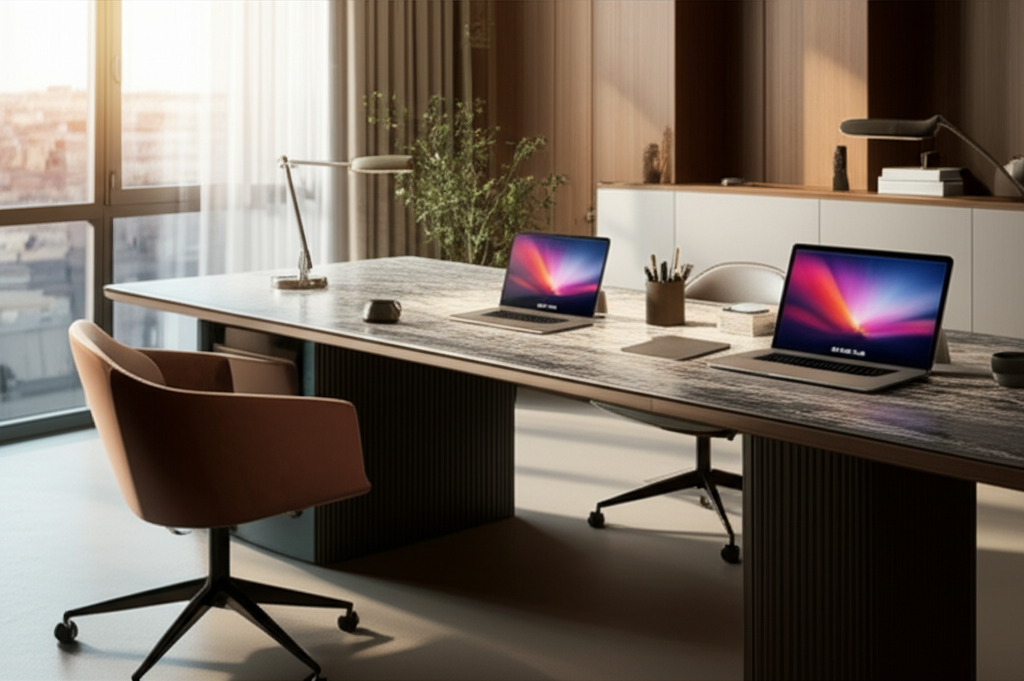
Published on: September 15, 2025 | Updated on: September 15, 2025
Create a cozy shared home office design that fosters focus and comfort. Discover essential genius for dual-purpose spaces, blending productivity with personal style. Learn smart solutions for maximizing space and minimizing distractions, making your shared workspace a haven for creativity and collaboration.
Cozy Shared Home Office Design: Essential Genius for Productive Harmony
Designing a home office that’s both functional and inviting can feel like a challenge, especially when that space needs to be shared. Juggling different work styles, personal preferences, and the need for quiet focus within a single room can lead to frustration and decreased productivity. But what if I told you that creating a cozy, shared home office is not only possible but can actually enhance your collaborative efforts and individual concentration? With the right approach, we can transform a potentially chaotic space into a harmonious haven. Get ready to discover the essential genius behind a truly effective and comforting shared workspace.

In today’s flexible work landscape, the lines between personal and professional spaces often blur. Many of us find ourselves needing a dedicated work area within our homes, and increasingly, these areas need to accommodate more than one person. A cozy shared home office design isn’t just about squeezing two desks into a spare room; it’s about intelligently crafting a dual-purpose environment that respects individual needs while fostering a sense of shared purpose. This approach can lead to increased efficiency, better work-life balance, and a more pleasant atmosphere for everyone involved.
A well-designed shared office minimizes clutter and maximizes productivity for all users. It acknowledges that even in a shared space, personal comfort and focus are paramount for successful work.
Before you even think about paint colors or desk accessories, the most crucial step in creating a successful cozy shared home office design is to understand the unique needs of everyone who will use the space. This involves open communication and a willingness to compromise. What are the primary work functions for each person? Are there specific equipment needs, like multiple monitors or printers? What are the noise tolerance levels and preferred working hours? Answering these questions upfront will form the foundation of your design.
Understanding each user’s workflow, equipment requirements, and personal preferences is key to designing a functional shared space. This ensures that the final setup supports both individual productivity and shared harmony.
Understanding Work Styles and Personalities
Take time to discuss how each person likes to work. One might thrive in complete silence, while the other might prefer background music. One might be a minimalist, keeping their desk pristine, while the other might have stacks of reference materials. Recognizing these differences is not about assigning blame; it’s about finding solutions that accommodate everyone. Perhaps noise-canceling headphones can be a shared resource, or a designated “messy” zone can be established for the more organically organized individual.
Acknowledging and respecting diverse work styles is vital for a peaceful shared office. It allows for personalized solutions within a common framework.
Essential Equipment and Technology Needs
List out all the necessary equipment for each user. This includes computers, monitors, keyboards, mice, webcams, and any specialized tools or software. Consider how these items will connect and power up. Will you need additional power strips, surge protectors, or docking stations? Think about shared resources like printers, scanners, or shredders, and decide on their placement to ensure easy access for all without creating bottlenecks.
A comprehensive equipment inventory prevents last-minute rushes and ensures all technological needs are met. It’s the bedrock of a functional shared workspace.
The physical arrangement of your shared workspace is critical for both functionality and the feeling of coziness. When space is at a premium, clever layout choices can make all the difference. The goal is to create distinct zones that offer a sense of personal territory while maintaining an open and accessible feel. Consider the flow of movement within the room and how natural light can be best utilized.
Strategic furniture placement creates distinct work zones, enhancing privacy and focus within a shared environment. This optimizes flow and maximizes the perceived spaciousness of the room.
The “Buddy Desk” Approach
A popular and often space-efficient solution is the buddy desk setup. This involves two desks placed side-by-side, back-to-back, or in an L-shape. When placed side-by-side with a divider, it can offer a sense of individual space while still feeling connected. Back-to-back setups can be excellent for reducing visual distractions between users. An L-shaped configuration can provide more expansive personal workspace for each individual.
Buddy desks can be an effective way to delineate individual workspaces while fostering a sense of shared purpose. They offer flexibility in configuration to suit various room shapes.
Creating Zones with Furniture and Dividers
Even within a single desk, or when desks are placed together, you can create zones using furniture and visual cues. Bookshelves or storage units can act as natural dividers, separating workspaces and providing much-needed storage. Low-profile screens or even strategically placed plants can offer a subtle visual barrier, giving each person a sense of their own territory. The key is to create a feeling of separation without making the space feel cramped or isolating.
Thoughtful use of furniture and dividers establishes clear boundaries and enhances privacy without making the space feel confined. This promotes individual focus while maintaining an open feel.
Optimizing for Natural Light and Airflow
Natural light is a powerful tool for boosting mood and productivity. Position desks to take advantage of windows, but be mindful of glare on screens. If direct sunlight is an issue, consider adjustable blinds or sheer curtains. Good airflow is also essential for maintaining a fresh and alert environment. Ensure that the layout doesn’t block vents or create stagnant air pockets.
Maximizing natural light and ensuring good airflow are crucial for a comfortable and productive shared workspace. These elements significantly impact well-being and focus.
Ergonomics for Two: Ensuring Comfort and Health
When designing a cozy shared home office, ergonomics isn’t just an afterthought; it’s a non-negotiable element for everyone’s health and productivity. What works for one person might not be ideal for another, so finding ergonomic solutions that can be adjusted is key. Investing in comfortable, supportive seating and adjustable workstations will pay dividends in reduced fatigue and improved focus.
Prioritizing ergonomics for each user is paramount for long-term health and sustained productivity. Adjustable furniture ensures personalized comfort and support.
The Foundation: Ergonomic Chairs
The chair is arguably the most important piece of ergonomic furniture. Look for chairs that offer adjustable height, lumbar support, armrests, and tilt mechanisms. If budgets are tight, consider adding a good lumbar support cushion to a standard chair. For a shared space, choosing chairs that are easily adjustable ensures that both users can find a comfortable and supportive position.
Investing in adjustable, supportive ergonomic chairs is crucial for preventing discomfort and promoting good posture. This ensures well-being for all users.
Standing Desks and Desk Converters
Standing desks or desk converters offer a fantastic way to combat sedentary work habits. They allow users to alternate between sitting and standing throughout the day, which can improve circulation and energy levels. For a shared space, consider a single large standing desk that can be adjusted for both users, or individual desk converters that can be placed on existing desks. This offers flexibility for both individuals to manage their preferred working posture.
Incorporating standing desks or converters allows for dynamic work postures, reducing fatigue and boosting energy. This promotes a healthier and more active workday.
Monitor Placement and Eye Strain Reduction
Proper monitor placement is vital to prevent neck and eye strain. The top of the screen should be at or slightly below eye level, and about an arm’s length away. For shared desks, monitor arms or stands can help achieve the correct height and angle for each user. If you have dual monitors, ensure they are positioned to minimize head turning.
Correct monitor placement and adjustable stands are essential for reducing eye strain and preventing neck pain. This ensures visual comfort and focus.
Storage Solutions: Decluttering for Dual Productivity
Clutter is the enemy of focus and coziness. In a shared home office, effective storage solutions are paramount to keep both individual workspaces and the common area tidy. The goal is to have everything have its place, making it easy to find what you need without creating visual noise. Think vertically, horizontally, and creatively to maximize every inch of space.
Smart storage solutions are key to maintaining an organized and serene shared workspace. This minimizes distractions and maximizes efficiency.
Vertical Storage: Shelving and Wall Units
Utilizing vertical space is one of the most effective ways to declutter. Wall-mounted shelves, tall bookshelves, or modular storage units can house files, books, and supplies without taking up valuable desk real estate. Consider units with both open and closed sections to display decorative items or hide less aesthetically pleasing essentials. For a cozy feel, opt for wood tones or soft colors.
Vertical storage maximizes space and keeps clutter at bay, creating a more organized and visually appealing environment. This is essential for shared areas.
Desk Organizers and Drawer Inserts
Even with larger storage solutions, desk organizers are indispensable for keeping immediate work areas tidy. Pen holders, letter trays, and drawer inserts help compartmentalize small items like paperclips, staples, and charging cables. For a shared desk, each user might have their own set of organizers or a designated drawer to maintain personal order.
Desk organizers and drawer inserts keep essential items within reach and prevent small clutter from accumulating. This maintains a sense of order for each user.
Digital Organization and Cable Management
Beyond physical clutter, digital disarray can also be a productivity killer. Encourage both users to maintain organized digital files and clear desktop spaces. Cable management is another crucial aspect of a tidy shared office. Use cable clips, ties, sleeves, or a cable management box to wrangle unruly cords, making the space look cleaner and safer.
Effective digital and cable management contributes significantly to a clean, organized, and frustration-free shared workspace. This reduces visual noise and potential hazards.
Lighting for Ambiance and Focus
The right lighting can transform a functional workspace into a cozy sanctuary. It impacts mood, reduces eye strain, and can even boost productivity. In a shared office, striking a balance between sufficient task lighting and ambient lighting is key. Consider the needs of both users and the overall atmosphere you want to create.
Thoughtful lighting design enhances both the cozy ambiance and the functional needs of a shared workspace. It significantly impacts mood and productivity.
Layering Light: Ambient, Task, and Accent
A well-lit space utilizes multiple layers of light. Ambient lighting provides overall illumination, often from a ceiling fixture or floor lamp. Task lighting, like desk lamps, provides focused light for individual work. Accent lighting can highlight artwork or decorative elements, adding warmth and personality. For a cozy shared office, aim for warm-toned bulbs (around 2700K-3000K) for ambient and accent lighting.
Combining ambient, task, and accent lighting creates a versatile and inviting atmosphere. This caters to both general needs and specific work requirements.
Natural Light Optimization and Glare Control
As mentioned earlier, maximizing natural light is ideal. However, direct sunlight can cause glare on computer screens, leading to eye strain and reduced visibility. Sheer curtains, adjustable blinds, or even strategically placed desk mats can help diffuse harsh light. If your desks face each other, consider positioning them so that neither user is looking directly into a window.
Controlling glare from natural light and positioning desks to avoid direct sun is essential for visual comfort. This maximizes the benefits of natural illumination.
Desk Lamps and Personal Control
Individual desk lamps offer personalized lighting control, which is invaluable in a shared space. One person might prefer brighter light for detailed work, while the other might prefer a softer glow. Look for lamps with adjustable arms and dimming capabilities. This allows each user to tailor their immediate workspace lighting to their specific needs without disturbing the other.
Personalized desk lamps empower each user to control their immediate lighting environment. This caters to individual preferences and task requirements.
Décor and Personalization: Making it Cozy and Yours
A cozy shared home office design isn’t just about functionality; it’s about creating a space that feels welcoming and reflects the personalities of its occupants. Personalization is key to making a shared space feel less like a sterile office and more like an extension of your home. However, in a shared environment, finding common ground and avoiding overwhelming sensory input is important.
Injecting personality and warmth through décor transforms a functional space into a truly cozy and inviting shared office. This balances individual expression with collective harmony.
Color Palette for Calm and Focus
Color has a profound impact on mood and productivity. For a cozy shared space, consider calming, neutral palettes as a base. Think soft grays, warm beiges, muted blues, or gentle greens. These colors create a serene backdrop that can be enhanced with pops of color through accessories or artwork. Avoid overly bright or jarring colors that can be distracting.
A well-chosen color palette promotes a calm and focused atmosphere, enhancing the cozy feel of the shared workspace. Neutrals provide a versatile base for personalization.
Incorporating Natural Elements
Bringing the outdoors in can significantly enhance the cozy factor. Plants not only add a touch of life and color but also improve air quality. Consider low-maintenance options like snake plants, ZZ plants, or succulents. Natural materials like wood, rattan, or stone in furniture and décor can also add warmth and texture to the space.
Natural elements like plants and wood add warmth, texture, and life to the office, significantly boosting its cozy appeal. This connects the workspace to the natural environment.
Artwork and Personal Touches
Allow each user to bring in a few personal items or pieces of artwork that inspire them. This could be framed photos, motivational quotes, or favorite prints. The key is moderation. Too many personal items can lead to clutter and distraction. Consider a shared bulletin board or a designated shelf where each person can display their chosen items.
Thoughtful inclusion of artwork and personal items makes the shared space feel unique and inviting. This allows for individual expression within a harmonious design.
Noise Management: Finding Peace in Proximity
One of the biggest challenges in a cozy shared home office design is managing noise. Different work styles and the proximity of individuals can lead to distractions. Implementing strategies to minimize noise is crucial for maintaining focus and a peaceful working environment.
Effective noise management strategies are essential for maintaining focus and a serene atmosphere in a shared workspace. This minimizes distractions and enhances productivity.
Soundproofing and Absorption Solutions
While full soundproofing might be impractical, you can take steps to absorb sound. Soft furnishings like rugs, curtains, and upholstered furniture can help dampen noise. Acoustic panels, while sometimes looking industrial, come in decorative options that can add to the aesthetic while improving sound quality. Even hanging tapestries or thick blankets on walls can make a difference.
Acoustic treatments and soft furnishings help absorb ambient noise, creating a quieter and more focused working environment. This minimizes sound distractions.
Noise-Canceling Headphones and White Noise Machines
For individual focus, high-quality noise-canceling headphones are an excellent investment. They allow each person to create their own bubble of silence, even in a noisy environment. A white noise machine or a fan can also provide a consistent, unobtrusive background sound that masks sudden noises and helps with concentration.
Providing noise-canceling headphones and considering a white noise machine are practical solutions for individual focus. This empowers users to control their auditory environment.
Establishing Quiet Hours and Communication Protocols
Setting clear expectations and communication protocols is vital. Agree on “quiet hours” when deep concentration is required, and establish a system for signaling when someone needs uninterrupted focus. A simple visual cue, like a small sign on the desk or a colored marker on a shared calendar, can be very effective. Open communication about noise levels is key to preventing friction.
Establishing clear communication protocols and quiet hours fosters mutual respect and minimizes noise-related conflicts. This ensures a harmonious working relationship.
Technology Integration and Cable Management
Seamless technology integration and meticulous cable management are the unsung heroes of a functional and aesthetically pleasing cozy shared home office design. Tangled cords and outdated tech setups can detract from both productivity and the overall ambiance. Planning for how devices will connect, charge, and be stored is as important as choosing furniture.
Intelligent technology integration and organized cable management are crucial for a clean, efficient, and frustration-free shared workspace. This enhances both functionality and aesthetics.
Power Solutions and Surge Protection
Ensure there are enough accessible power outlets for both users and all their devices. Consider a power strip with multiple outlets and USB ports, or a dedicated power hub. Surge protectors are essential to safeguard expensive equipment from power fluctuations. For a cleaner look, opt for power strips that can be mounted under a desk or housed in a cable management box.
Adequate power solutions and surge protection are vital for keeping devices charged and safe. This ensures uninterrupted workflow and protects valuable equipment.
Centralized Printing and Scanning Solutions
If both users require printing or scanning capabilities, consider a single, high-quality multi-function printer that can be placed in a convenient, shared location. This avoids the need for two separate devices, saving space and cost. Ensure it’s easily accessible and networked for both computers.
A single, well-placed multi-function printer can serve both users efficiently, saving space and resources. This streamlines shared document management.
Wireless Technology and Docking Stations
Embrace wireless technology whenever possible to reduce cable clutter. Wireless keyboards, mice, and chargers can significantly tidy up a workspace. For users with multiple devices, a docking station or USB hub can consolidate connections, allowing for easy switching between laptops and peripherals with a single cable.
Utilizing wireless technology and docking stations minimizes cable clutter and simplifies device connectivity. This contributes to a cleaner and more efficient setup.
What are the best desk types for a cozy shared home office design?
For a cozy shared home office, consider buddy desks placed side-by-side with a small divider, back-to-back desks to create distinct zones, or an L-shaped desk configuration for more individual space. The best choice depends on your room dimensions and how much personal space each user requires.
How can I make a shared home office feel cozy and not sterile?
To make a shared office cozy, focus on warm color palettes, natural materials like wood and plants, soft lighting with dimmable options, and comfortable textures like rugs or throw blankets. Allow each user to incorporate a few personal decorative items that inspire them.
Is it possible to have separate zones in a small shared home office?
Yes, absolutely! You can create separate zones using furniture placement (like a bookshelf between desks), visual dividers such as screens or plants, or by using different rugs to define each person’s workspace. Even distinct desk organizers can help delineate personal areas.
What are the most important ergonomic considerations for a shared space?
The most important ergonomic considerations are adjustable seating and monitor heights. Ensure that both users can easily modify their chairs and desk setups to fit their individual body types and preferences, preventing strain and promoting good posture.
How do I deal with differing noise levels and preferences in a shared office?
Effective strategies include using noise-canceling headphones, incorporating sound-absorbing materials like rugs and curtains, and establishing clear communication protocols like “quiet hours.” A white noise machine can also help mask disruptive sounds.
Can a cozy shared home office design accommodate different work styles?
Yes, it can by providing individual customization options for lighting and desk setup, offering private storage solutions, and implementing noise management strategies. Open communication about needs and preferences is key to balancing different work styles.
Creating a cozy shared home office design is an exercise in thoughtful planning, open communication, and creative problem-solving. It’s about more than just placing two desks in a room; it’s about crafting an environment that supports the productivity, well-being, and unique needs of everyone who uses it. By focusing on smart layout strategies, essential ergonomic principles, effective storage, harmonious lighting, and personalized décor, you can transform your shared space into a haven of focus and comfort. Remember, the goal is to foster a sense of both individual territory and shared purpose, ensuring that your workspace is not just functional but also a genuinely pleasant place to be. Embrace these essential genius tips, and you’ll be well on your way to a more productive and cozy shared home office experience.
