


Published on: September 16, 2025 | Updated on: September 16, 2025
Transform your dining room into a functional and stylish home office for two with this essential guide, offering smart solutions for space, organization, and productivity.
The dining room, often a hub for family meals and social gatherings, can feel like a wasted space when you’re working from home, especially if you need a dedicated area for two. Juggling work and life in the same space can be challenging, but converting this underutilized area into a dual home office is entirely achievable. This guide will walk you through every step, ensuring your new workspace is both productive and pleasant for both occupants. Get ready to reimagine your dining room into a haven of efficiency and comfort.

Creating a home office for two within a dining room requires thoughtful planning and smart design choices to ensure both individuals have adequate personal space and functional work areas. It’s about balancing shared needs with individual requirements. We’ll explore how to make this transition seamless and successful.
Understanding Your Needs: A Collaborative Planning Phase
Before any furniture moves, sit down together and discuss your individual work habits, needs, and preferences. What essential equipment does each person require? How much storage is needed for each of you? Understanding these core requirements is the bedrock of a successful shared office.
Individual Work Styles: Do you need quiet focus or are you comfortable with background noise? Do you prefer standing or sitting while you work?
Equipment Essentials: List all necessary items, from monitors and laptops to printers and stationery.
Storage Requirements: Categorize items needing storage: active files, reference materials, personal effects, and office supplies.
Aesthetic Preferences: Discuss desired moods and styles to create a cohesive, yet personalized, environment.
Layout Strategies: Designing for Two in a Dining Room
The layout is crucial for a functional dual office. The goal is to create distinct work zones that minimize distractions while maximizing efficiency. Consider how you can divide the space visually and functionally.
Option 1: The Face-to-Face Setup
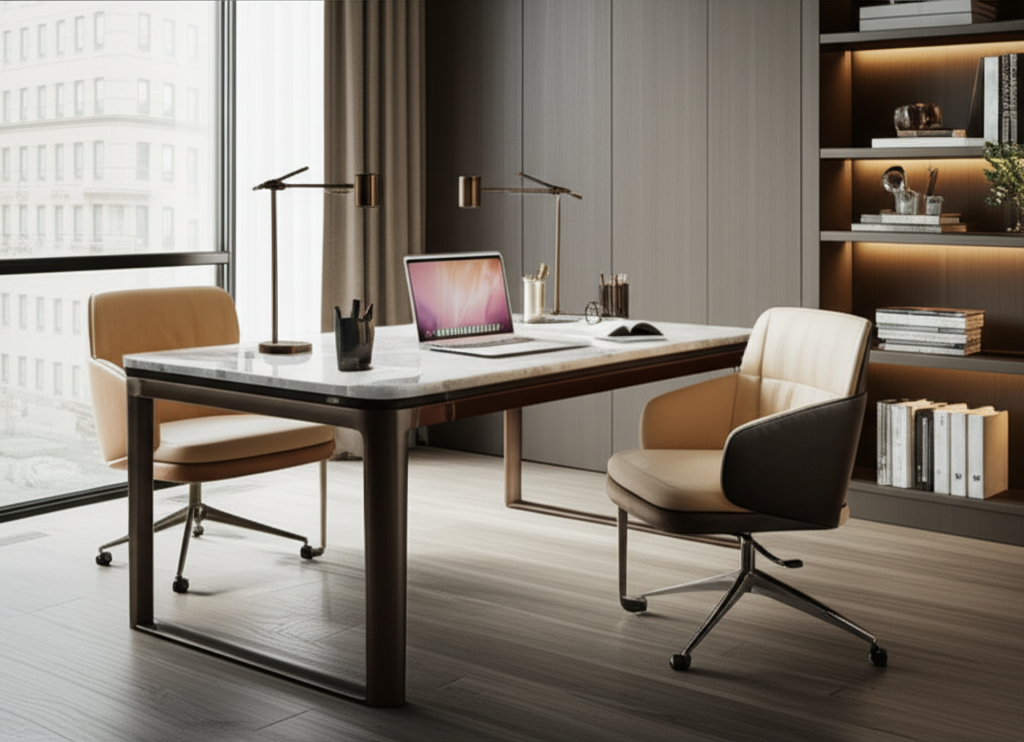
This arrangement places two desks facing each other, fostering a sense of connection and collaboration. It can be effective in longer, narrower dining rooms.
Pros: Encourages communication, visually divides the space, good for shared projects.
Cons: Can lead to direct visual distractions, potential for personality clashes if not managed.
To make this work, ensure adequate legroom and consider a shared central element like a low bookshelf or plants to act as a subtle divider. Ensure each person has enough desk depth for their monitors and peripherals without encroaching on the other’s space.
Option 2: The Side-by-Side Setup
Positioning desks adjacent to each other can offer more personal space and reduce direct eye contact distractions. This works well in wider rooms or when using longer desks.
Pros: Offers more personal space, reduces direct distractions, can feel more private.
Cons: Less opportunity for spontaneous collaboration, might require more floor space.
This layout is ideal when individuals have different work rhythms or require varying levels of focus. A shared monitor stand or a small partition can add a layer of separation.
Option 3: The L-Shaped or Corner Setup
If your dining room has an alcove or corner, you can create an L-shaped workspace for one or both individuals, maximizing the use of available wall space. This can be particularly effective for creating distinct zones within a smaller footprint.
Pros: Efficient use of corner space, creates clear boundaries.
Cons: Can feel a bit isolated, might limit natural light access for one person.
This setup often allows for more expansive desk surfaces and better separation, especially if each person gets their own corner. Consider how power outlets are accessible in these configurations.
Furniture Selection: Smart Choices for a Shared Workspace
Choosing the right furniture is paramount when you convert dining room to home office for two. Prioritize functionality, ergonomics, and space-saving designs.
Desks: The Foundation of Your Office
For a shared dining room office, think about desk size, shape, and functionality.
Two Separate Desks: Opt for matching or complementary desks that fit the allocated space. Consider desks with built-in storage or cable management systems.
A Large Double Desk: A single, long desk can offer a unified workspace, but ensure there’s enough depth and separation for two people. Look for desks with divided sections or ample surface area.
Corner Desks: These can maximize space efficiency, especially in rooms with an alcove. They can create distinct zones for each person.
When selecting desks, measure your dining room carefully. Ensure there’s enough clearance for chairs to move freely and for comfortable passage. Consider adjustable-height desks for added ergonomic benefits.
Ergonomic Seating: Investing in Your Well-being
With two people working for extended periods, ergonomic chairs are non-negotiable. Poor posture can lead to pain and reduced productivity.
Adjustability is Key: Look for chairs with adjustable height, lumbar support, armrests, and tilt functions.
Comfort and Support: Ensure chairs are comfortable for long sitting sessions and provide adequate support for the back.
Style Harmony: While function comes first, choose chairs that complement your chosen desk style and the overall aesthetic of your home.
Even budget-friendly ergonomic chairs can make a significant difference. If budget is a concern, consider investing in one high-quality chair and a more basic but comfortable option for the other.
Lighting: Illuminating Your Productivity
Good lighting is crucial for reducing eye strain and enhancing mood, especially when sharing a space. A layered lighting approach is best.
Natural Light: Position desks to maximize natural light from windows. Avoid placing screens directly in front of or behind windows to prevent glare.
Ambient Lighting: Ensure the room has general overhead lighting that is bright enough for the entire space.
Task Lighting: Each individual should have a dedicated desk lamp for focused work. This allows for personalized brightness and reduces reliance on the main room light.
Consider adjustable desk lamps with different brightness settings and color temperatures. Smart bulbs can also offer customizable lighting experiences.
Storage Solutions: Taming the Clutter for Two
Effective storage is vital for maintaining an organized and clutter-free workspace, especially when it needs to accommodate two people.
Vertical Storage
Utilize wall space to keep desks clear.
Shelving Units: Open shelves or cabinets can store books, binders, and decorative items.
Wall-Mounted Organizers: Pegboards, file holders, and magnetic strips can keep smaller items accessible and off the desk.
Consider a shared bookshelf or individual wall-mounted units for each person’s supplies. This helps delineate personal storage areas.
Desk Organizers
Keep immediate work areas tidy.
Drawer Inserts: Organize pens, paperclips, and other small supplies.
Monitor Stands with Storage: These elevate screens and often provide space for keyboards or small items.
Cable Management: Keep cords tidy and out of sight with clips, sleeves, or a cable management box.
For a shared space, clear labeling can prevent mix-ups and ensure everyone knows where their items belong.
Creating Distinct Zones: Personalizing Shared Space
While the dining room is a shared space, creating distinct zones for each individual fosters a sense of personal territory and reduces conflict.
Visual Dividers
Use elements to subtly separate workspaces.
Room Dividers: Freestanding screens or tall bookshelves can create visual barriers.
Plants: Strategically placed plants can add greenery and a natural separation.
Area Rugs: Different rugs under each desk area can visually define individual zones.
The goal is not to create complete isolation but a gentle separation that respects each person’s need for personal space.
Color and Décor
Allow for individual expression within a cohesive scheme.
Accent Colors: Each person can choose a small accent color for their immediate desk area, like a desk mat or a few accessories.
Personal Touches: Encourage the display of personal items, but set guidelines to avoid overwhelming the shared space.
Maintaining a consistent base color palette throughout the room helps unify the space despite individual touches.
Technology and Connectivity: Powering Your Dual Office
Ensuring seamless technology integration is crucial for a functional dual home office.
Power and Connectivity
Surge Protectors: Essential for protecting multiple devices. Opt for models with ample outlets and USB ports.
Wi-Fi Strength: Ensure your Wi-Fi signal is strong enough to support two active users simultaneously. Consider a Wi-Fi extender if needed.
Cable Management: As mentioned earlier, this is vital for a tidy and safe workspace.
Running extension cords can be a hazard; try to position desks near existing outlets or use discreet power strips.
Shared Technology
Printer/Scanner: A single shared device can save space and cost. Place it centrally if possible.
Shared Monitor (Optional): If projects often require collaboration, a larger shared monitor could be beneficial, though this requires careful space planning.
Consider how you will manage shared devices, such as scheduling printing times or ensuring both users know how to operate them.
Noise Management: Finding Focus in a Shared Environment
Working together in the same room can present noise challenges. Implementing strategies to mitigate distractions is key.
Personal Solutions
Noise-Canceling Headphones: An essential tool for deep focus and blocking out ambient noise.
White Noise Machines/Apps: Can help mask distracting sounds and create a more consistent sound environment.
Encourage the use of headphones when deep concentration is needed.
Environmental Solutions
Soft Furnishings: Rugs, curtains, and upholstered furniture can absorb sound and reduce echo.
Strategic Placement: Position desks away from high-traffic areas or noisy appliances within the home.
Consider if any acoustic panels could be discreetly incorporated into the décor to further dampen sound.
Productivity Hacks for a Dual Office
Maintaining productivity when sharing a space requires clear communication and mutual respect.
Establish Work Hours: Agree on core working hours and when quiet time is expected.
Communication Signals: Develop subtle signals for when someone needs uninterrupted focus (e.g., a specific item on their desk).
Scheduled Breaks: Take breaks together or at staggered times to avoid constant disruption.
Task Management Tools: Utilize shared digital tools for project collaboration and to-do lists.
Regular check-ins can help address any emerging issues before they become significant problems.
Maintaining the Space: Keeping it Tidy and Functional
A shared workspace needs ongoing attention to remain productive and pleasant.
Daily Tidy-Up: Spend 5-10 minutes at the end of each workday clearing desks and putting items away.
Weekly Deep Clean: Dedicate time each week for dusting, organizing files, and ensuring all equipment is functioning correctly.
* Shared Responsibility: Clearly define who is responsible for what tasks, whether it’s emptying the shredder or restocking supplies.
A little effort each day goes a long way in preventing clutter from accumulating and making the space more enjoyable for both occupants.
Frequently Asked Questions
Q1: How can I divide a dining room for two home offices without building walls?
You can use furniture like tall bookshelves, screens, or even large potted plants as visual dividers. Area rugs can also define individual zones.
Q2: What’s the best desk setup for a dining room office for two?
Consider facing desks towards each other for collaboration, side-by-side for more personal space, or L-shaped in corners for maximum efficiency.
Q3: How do I manage different lighting needs for two people in one room?
Utilize natural light effectively, ensure good ambient overhead lighting, and provide each person with an adjustable task lamp for personalized illumination.
Q4: Is it possible to have enough storage for two people in a converted dining room?
Yes, by maximizing vertical space with shelves and wall organizers, and using desk organizers and cable management solutions effectively.
Q5: How can we avoid distractions and noise when converting a dining room to an office for two?
Use noise-canceling headphones, establish clear communication signals for focus time, and incorporate soft furnishings to absorb sound.
Q6: What if we have different aesthetic preferences for our shared office?
Establish a neutral base color palette and allow each person to incorporate personal touches or accent colors in their immediate workspace.
Conclusion: Your Productive Dual Workspace Awaits
Converting your dining room to a home office for two is a practical and rewarding endeavor that can significantly enhance your work-from-home experience. By carefully considering layout, furniture, lighting, and storage, you can create a functional, comfortable, and stylish shared workspace. Remember that open communication and a willingness to compromise are key to making this dual office setup a success. Embrace the process, implement these essential tips, and soon you’ll both be enjoying a more organized, productive, and harmonious work environment.
